Two of the standout options in this space are Titan Email, a sleek, modern solution built for simplicity, and Zoho Mail, a comprehensive platform backed by an extensive ecosystem of business tools. Both offer custom domain email hosting but cater to very different user needs and business strategies.
This side-by-side comparison—grounded in feature analysis and user feedback from G2.com—breaks down their key strengths, pricing models, usability, and long-term value to help you choose the best email platform for your business in 2025.
Titan vs Zoho Mail at a Glance
| Category | Titan Email | Zoho Mail |
|---|---|---|
| G2 Rating | 4.6 / 5 (558+ reviews) | 4.4 / 5 (700+ reviews) |
| Best For | Freelancers, solopreneurs, small businesses | SMBs and enterprises needing integrated tools |
| Key Strength | Sleek interface, bundled with web hosting | Complete business suite (Zoho Workplace) |
| Highlight Features | Read Receipts, Follow-ups, Send Later | Admin Console, Docs, CRM, Tasks |
| Pricing | From $2–2.45/user/month, no free tier | Free for up to 5 users; Paid plans from ~$1/user |
| Ease of Use | Highly intuitive, beginner-friendly | Feature-rich, more complex |
| Customer Support | Highly rated | Some users report slower support |
While Titan receives a slightly higher user satisfaction score, each platform excels in different ways. Titan earns praise for its clean interface and simplicity, while Zoho is known for delivering serious functionality and scalable tools.
User Experience: Simple vs. Comprehensive
If you value a modern, uncluttered interface that makes email a pleasure to use, Titan leads the pack. Its design is clean, fast, and straightforward—perfect for busy entrepreneurs and teams that want to stay productive without a steep learning curve. Users frequently mention its ease of use and attractive interface.
Zoho Mail, in contrast, offers a more traditional interface, dense with features and settings. This makes it slightly more complex for new users, but powerful for those who need deep functionality. It serves as a portal into the full Zoho Workplace suite, turning your inbox into a multifunctional command center.
Productivity Tools: Smart Features That Work for You
Both platforms include tools designed to streamline communication and keep you on top of your email game.
Titan Email includes:
- Read Receipts – Know exactly when your emails are opened.
- Send Later – Schedule emails to send at the best time.
- Follow-up Reminders – Stay on top of responses with automatic nudges.
- Email Templates – Save reusable messages for common replies.
Zoho Mail expands on this with:
- Advanced Admin Panel – Ideal for managing multiple users and domains.
- Integrated Tasks and Calendar – Built-in tools to organize meetings and follow-ups.
- Notes and Bookmarks – Turn emails into actionable notes or save important messages for later.
The key difference? Titan offers immediate productivity in a polished package, while Zoho delivers robust, deeply integrated features across its suite of apps.
Collaboration and Ecosystem Integration
This is where the two platforms take radically different paths.
Titan integrates tightly with web hosting providers like Hostinger, WordPress.com, and Namecheap. It’s often available as a bundled add-on during website setup, making it incredibly convenient for new businesses. However, it doesn’t yet have the breadth of integrations seen in larger ecosystems.
Zoho Mail, on the other hand, is part of the broader Zoho ecosystem—a suite of over 40 business apps that work in perfect sync. With Zoho CRM, Books, Projects, Docs, and more, Zoho Mail becomes more than an email client—it’s the gateway to your entire digital workplace. For teams that want everything in one place, this ecosystem is a major advantage.
Pricing & Plans: Free vs. Premium-Only
Zoho Mail shines when it comes to affordability—especially for startups:
- Free Tier: Up to 5 users with 5GB storage per user and access to office tools.
- Mail Lite: Ideal for growing businesses needing more storage and control.
- Mail Premium: For advanced users needing larger attachments, encryption, and branding.
- Zoho Workplace: A bundled suite including Mail, CRM, Docs, Sheets, and more.
Titan Email, in contrast, doesn’t offer a free plan. Its pricing starts at around $2 per user/month, typically bundled with hosting services. The focus here is premium quality and simplicity, not freemium features.
Final Thoughts: Which One Should You Choose?
Your choice between Titan and Zoho Mail depends on your business structure, tech needs, and personal preference.
Choose Titan Email if:
- You’re a solopreneur, freelancer, or a small business owner.
- You want a modern, easy-to-use interface.
- You’re buying hosting and want integrated professional email.
- You need core features without the clutter of an entire suite.
Choose Zoho Mail if:
- You’re running or planning to scale a growing business.
- You want an all-in-one business platform with email, CRM, and accounting.
- You prefer a generous free plan to get started.
- You need high levels of admin control and customization.
Both Titan and Zoho Mail deliver exceptional value—but in very different ways. Titan is about polished simplicity and focus, while Zoho is about flexibility and integration. Whether you’re looking for an elegant inbox or a fully-fledged business operating system, there’s a solution tailored for you.
Zoho Mail
Get a Free Professional Email Account Now
AI website builders are groundbreaking tools that utilize artificial intelligence to simplify and accelerate the website development process. Unlike conventional website builders that heavily rely on manual design and coding, AI website builders automate various aspects of website development, making it accessible to users with minimal to no technical background. These builders employ algorithms to understand user needs and preferences, generating tailored website designs, content suggestions, and even search engine optimization.
SitesGPT: Crafting Impressive Websites in Minutes with AI
SitesGPT is an AI-driven website builder engineered to streamline the entire website development process. By employing sophisticated AI algorithms, SitesGPT grasps your requirements and automatically produces a website customized to your specific needs. Whether you aim to create a business website, a personal portfolio, an online store, or a blog, SitesGPT provides an intuitive and efficient solution.
Key Features of SitesGPT:
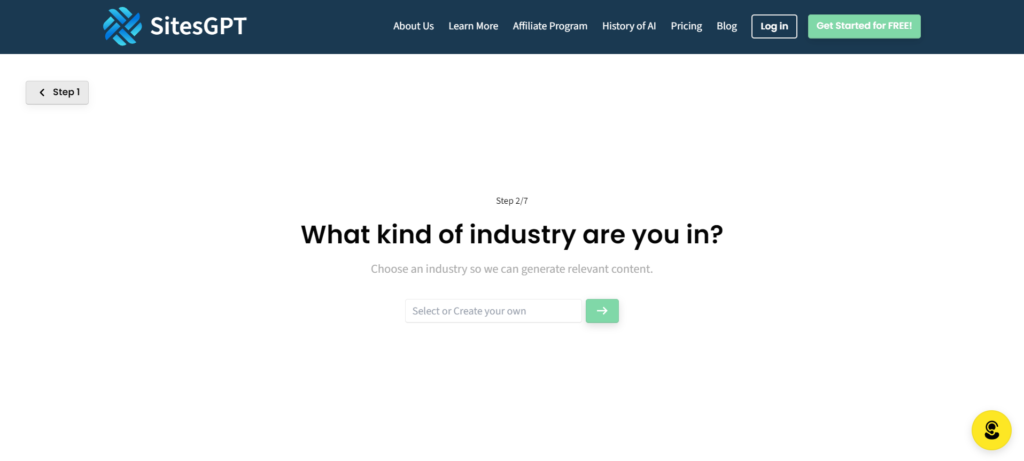
- Rapid AI-Powered Website Generation: The core strength of SitesGPT lies in its ability to generate a complete website within seconds. Users simply input some essential details about their business or purpose, and the AI takes over, instantly creating a visually appealing and well-organized website. This eliminates the lengthy process of manual design and development.
- Fully Adaptive Design: Every website built with SitesGPT is inherently responsive, meaning it will automatically adjust and appear fantastic across all devices, including desktops, tablets, and smartphones. This guarantees a seamless user experience for all your visitors.
- Simple Customization: While the AI handles the initial design, SitesGPT provides a range of customization options to personalize your website. Users can easily modify text, upload their own images, adjust color schemes, and select from various layouts to align with their brand identity and preferences.
- AI-Assisted Content Creation: SitesGPT can even aid in content creation by suggesting relevant text and incorporating placeholder content based on your website’s purpose. This can significantly save time and offer a starting point for users who need help with writing website copy.
- Search Engine Optimization (SEO) Tools: Recognizing the importance of online visibility, SitesGPT integrates basic SEO features to help your website rank better in search engine results. This may include an optimized website structure and the ability to add meta descriptions and titles.
- User-Friendly Interface: SitesGPT is designed with simplicity at its heart. Its intuitive drag-and-drop interface makes it easy for users of all technical abilities to navigate and make changes to their websites without needing any coding skills.
- Complimentary Platform Access (for basic use): SitesGPT offers a free plan, enabling individuals and businesses to establish a professional online presence without any initial cost. This makes it an accessible solution for those just starting out or with limited budgets.
- Cloud-Based Hosting: SitesGPT provides secure and dependable cloud-based hosting for all websites created on its platform. This ensures fast loading speeds and reliable performance for your visitors.

Versatile Applications of SitesGPT:
SitesGPT is a flexible platform empowering users to effortlessly create various types of websites, leveraging the speed and efficiency of AI:

- Business Websites: Establish a professional online presence to showcase your company details, services, team, and contact information. SitesGPT helps you quickly create informative and visually appealing websites to represent your brand.
- Personal Portfolios: Develop a dynamic online portfolio to highlight your skills, projects, and accomplishments. Whether you’re a designer, writer, artist, or professional in any field, SitesGPT offers a streamlined way to present your work to the world.
- Landing Pages: Design focused and high-converting landing pages for specific campaigns, product launches, or lead generation efforts. SitesGPT’s AI can help structure compelling layouts to drive desired actions.
- Informational Websites & Blogs: Share your expertise, insights, and passions through informative websites or blog formats. SitesGPT simplifies the process of creating content-rich platforms to connect with your audience.
- Event Websites: Quickly build websites to promote upcoming events, providing essential details like schedules, locations, and registration information.
Potential for Enhanced Features (Depending on Subscription Level):
SitesGPT offers different subscription levels that unlock a range of advanced features to enhance your website:
- More Pages
- Custom Domain Integration
- Advanced AI Features
- Increased Storage and Bandwidth
- Priority Support
- Advanced Customization Options
- Collaboration Features
Hostinger AI Website Builder: Effortless Site Creation Powered by Artificial Intelligence
The Hostinger AI Website Builder presents another compelling option for users seeking to build websites with the assistance of artificial intelligence. Integrated within Hostinger’s hosting platform, this builder aims to simplify the website creation process through AI-driven generation and an intuitive drag-and-drop interface.
Key Features of Hostinger AI Website Builder:

- AI-Driven Website Generation: Similar to SitesGPT, Hostinger’s AI builder allows users to swiftly generate a website by answering a few questions about their website’s purpose, industry, and desired style. The AI then constructs a tailored website framework with relevant layouts, text, and images.
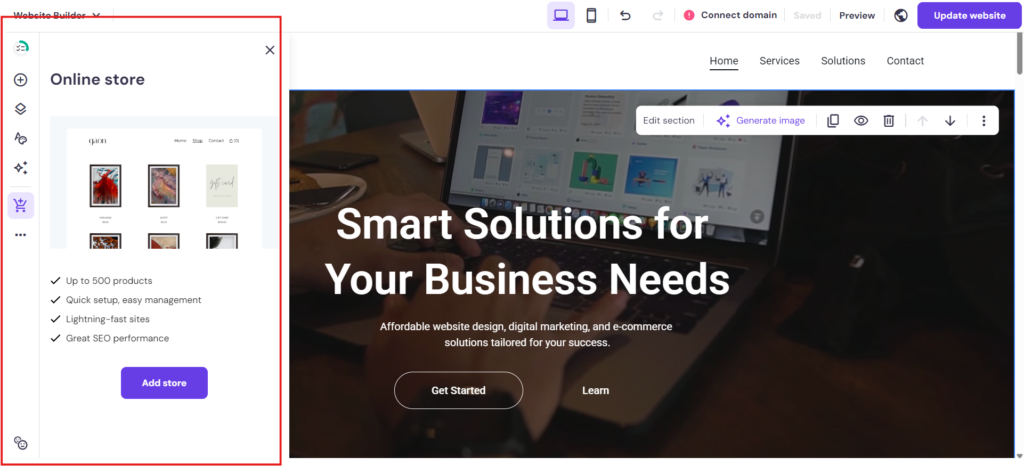
- Drag-and-Drop Editor: Once the AI generates the initial site, users can fully customize it using a user-friendly drag-and-drop editor. This allows for easy modification of all elements without requiring any coding knowledge.
- AI Writer: Hostinger’s AI extends beyond initial site generation by offering an AI writer tool to assist users in creating compelling website content for various sections, including headlines and product descriptions.
- AI Image Generator: Users can utilize the AI image generator to create unique visuals based on text prompts, adding a personalized touch to their website.
- SEO Tools: Hostinger’s platform includes tools and guidance to help users optimize their websites for search engines, improving online visibility.
- Integration with Hostinger’s Ecosystem: Being part of Hostinger’s platform, the AI website builder seamlessly integrates with their hosting services, domain registration, and SSL certificates, providing an all-in-one solution.
- E-commerce Functionality: Hostinger offers e-commerce features within its website builder, allowing users to create online stores and manage products, orders, and payments (available on specific plans).
SitesGPT vs. Hostinger AI Website Builder: A Comparative Overview
While both SitesGPT and the Hostinger AI Website Builder harness artificial intelligence to streamline website creation, they possess distinct characteristics and advantages:
| Feature | SitesGPT | Hostinger AI Website Builder |
| Core Function | Standalone AI-powered website builder with integrated hosting. | Website builder integrated within a comprehensive hosting platform. |
| Initial Site Creation | Very fast website generation based on user input. | Rapid website generation based on user input, emphasizing structure and relevant content. |
| Customization Options | Intuitive drag-and-drop editor with diverse customization possibilities. | Robust drag-and-drop editor with extensive customization capabilities. |
| AI Content Assistance | AI-driven content suggestions and placeholder content. | Dedicated AI Writer tool for generating website copy. |
| AI Image Generation | NIL | Includes an AI Image Generator based on text prompts. |
| Pre-designed Layouts | AI-generated layouts with customization options. | AI-generated layouts plus a library of customizable pre-designed templates. |
| Hosting Services | Integrated cloud-based hosting. | Integrated within Hostinger’s hosting infrastructure. |
| Domain & SSL Certificates | NIL | Typically offered as part of Hostinger’s hosting packages. |
| E-commerce Capabilities | NIL | Offers e-commerce functionality on specific plans. |
| SEO Features | Fundamental SEO features included. | Includes SEO tools and guidance. |
| Free Tier | Offers a free plan for basic use. | May have a free trial or limited free plan depending on Hostinger’s offerings. |
| Platform Integration | Primarily a standalone website builder. | Deeply integrated with Hostinger’s suite of online services. |
Selecting the Ideal AI Website Builder:
The optimal choice between SitesGPT and the Hostinger AI Website Builder hinges on your specific requirements and priorities:
- Opt for SitesGPT if: You prioritize swift website generation and a straightforward, independent platform with a potentially generous free option for basic use. If you need a quick way to establish a basic online presence without immediately requiring bundled hosting, SitesGPT could be a suitable starting point.
- Opt for Hostinger AI Website Builder if: You seek an all-encompassing solution that integrates website building with dependable hosting, domain options, and SSL certificates. The inclusion of an AI Writer and AI Image Generator can be a significant advantage for content creation. If you anticipate needing e-commerce features or prefer the stability and features of a well-established hosting provider, Hostinger’s offering is worth considering.
Getting Started with SitesGPT and Hostinger AI Website Builder:
SitesGPT:
- Sign Up: Visit the SitesGPT website and create a free account.
- Provide Information: Answer a few basic questions about your business, industry, or the type of website you want to create.
- AI Generates Your Site: In seconds, SitesGPT’s AI will generate a customized website based on your input.
- Customize and Publish: Use the intuitive editor to personalize the design and content of your website before publishing it live.
Hostinger AI Website Builder:
- Choose a Hosting Plan: Visit the Hostinger website (https://www.hostinger.com/) and select a hosting plan that includes the AI Website Builder.
- Describe Your Website: Once you have access to the builder, you’ll be prompted to provide information about your website’s purpose and style.
- AI Generates Your Site: Hostinger’s AI will generate a website based on your input.
- Customize and Publish: Use the drag-and-drop editor to personalize the design and content of your website before publishing it through Hostinger’s platform.
Conclusion: The Intelligent Future of Website Building
Both SitesGPT and the Hostinger AI Website Builder exemplify the exciting advancement of website creation, making it more accessible and efficient than ever before. By leveraging the power of artificial intelligence, these platforms empower individuals and businesses to establish a compelling online presence without the need for extensive technical skills or significant time investment. As AI technology continues to evolve, we can anticipate even more sophisticated and user-friendly website building solutions to emerge, further democratizing the process of getting online.
]]>What’s This All About?
If you’re running a business in Singapore, you’ve probably noticed how quickly we’re moving toward a cashless society. E-commerce is booming, and customers expect smooth, hassle-free payment options when shopping online. But with so many payment gateways to choose from, how do you know which one is right for your business?
I’ve taken a deep dive into five popular payment gateways available in Singapore—Fiuu Pay, Hitpay, Airwallex, Stripe, and PayPal—to help you make an informed decision. Let’s break down what each has to offer.
The Quick Rundown
Before we dive into the details, here’s a snapshot of each gateway:
- Fiuu Pay (formerly Razer Merchant Services): Strong in Southeast Asia with tons of local payment methods
- Hitpay: Clear pricing and super user-friendly, especially for small businesses
- Airwallex: Excellent for handling multiple currencies and global transactions
- Stripe: Developer-friendly with powerful customization options
- PayPal: Globally recognized brand with a massive user base
Let’s Talk About Fiuu Pay
What’s the deal with Fiuu Pay?
Fiuu Pay (previously known as Razer Merchant Services) is a payment gateway focused on Southeast Asia. If you’re targeting customers in Malaysia, Singapore, Indonesia, Philippines, Vietnam, and Thailand, this one’s worth considering. They rebranded from Razer Merchant Services in March 2024, now operating as an independent subsidiary of Razer Inc.
The costs
Fiuu Pay offers tiered pricing with Lite and Premium packages. The Premium package includes credit/debit card processing at 2.4%, for common merchants, the local card processing fee is 2.8%, without the usual 0.5 SGD fixed transaction fee, e-wallet processing at rates between 1.5% and 1.7%, also without the 0.50 SGD fixed transaction fee, and various Buy Now Pay Later options. If you are building a website and want to integrate Fiuu Pay, you may consider Vue Tech SG.
What currencies can I use?
They support several currencies including SGD, PHP, IDR, VND, THB, AUD, DKK, CHF, USD, and MYR—giving you good coverage for Southeast Asian markets.
What payment methods do they accept?
This is where Fiuu Pay really shines. They support over 110 payment methods across Southeast Asia, including:
- Cards: Mastercard, VISA, Diners Club, JCB, UnionPay
- Digital wallets: Apple Pay, Samsung Pay, Google Pay, Huawei Pay
- Internet banking: PayNow, DBS, OCBC, UOB, and other major banks
- E-wallets: GrabPay, Shopee Pay, Alipay, WeChat Pay
- Even cryptocurrencies like Bitcoin and Ethereum
How easy is it to set up?
Fiuu Pay offers plugins for platforms like Shopify, Woocommerce, and SiteGiant. API documentation for custom integrations, and a “Mobile XDK” for mobile applications. They also provide a Telegram developer forum for support.
Is it secure?
Yes—they’re PCI DSS Service Provider Level 1 compliant and have ISO 27001:2022 certification. They use tokenization to replace sensitive card details and claim to have one of the lowest dispute transaction ratios in the industry.
What about support?
Technical support is available via email at [email protected], and they offer dedicated account managers for business clients.
How do I get my money?
Clients can select daily or weekly settlement, the settlement fee can be waived under certain conditions.
Looking at Hitpay
What’s Hitpay all about?
Hitpay focuses on providing all-in-one payment solutions for small and medium-sized businesses in Singapore and the APAC region. Their website is hitpayapp.com/sg/.
The costs
Hitpay uses a transparent pay-per-transaction model with no subscription or hidden fees. For online payments, rates range from 0.65% + S$0.30 for PayNow (for transactions ≥ S$100) to 5.5% for various Buy Now Pay Later options, the local card payment fee is 2.8% + 0.50 SGD. The in-person payments are generally cheaper, with rates like 2.5% for domestic cards and 0.4% for PayNow. They also offer custom pricing for high-volume businesses.
What currencies can I use?
Hitpay supports more than 150 currencies, including SGD, IDR, MYR, VND, PHP, THB, INR, CNY, and AUD.
What payment methods do they accept?
They support over 50 payment methods, including:
- Cards: Visa, Mastercard, American Express
- Digital wallets: PayNow, GrabPay, ShopeePay, Apple Pay, Google Pay
- Buy Now, Pay Later: PayLater by Grab, SPayLater, ShopBack PayLater, Atome
- Others: UnionPay, WeChat Pay, Alipay, and UPI (for Indian consumers)
How easy is it to set up?
Hitpay offers plugins for Shopify, WooCommerce, and Magento, as well as robust APIs. For businesses without a website, they provide payment links and recurring billing options. Many integration options require no coding knowledge, making it accessible for SMEs.
Is it secure?
Hitpay is PCI DSS compliant and uses advanced encryption, 2-Factor Authentication, and Transport Layer Security. They’ve partnered with Stripe for enhanced fraud detection and use tokenization to protect sensitive data.
What about support?
Support is available via email and WhatsApp, and they provide self-serve guides. User reviews generally praise their user-friendly interface and strong customer support.
How do I get my money?
Hitpay offers next-day payouts directly to business bank accounts and supports various local payment networks, including FAST in Singapore. For SGD payouts, they provide free local transfer options.
Airwallex in Focus
What’s the story with Airwallex?
Airwallex has its global headquarters in Singapore and is licensed by the Monetary Authority of Singapore as a Major Payment Institution. They’ve seen significant growth, with a 153% year-on-year revenue increase for FY2024. Their website is airwallex.com/sg/.
The costs
For domestic cards and wallets (Visa, Mastercard, AmEx, Apple Pay, Google Pay), Airwallex charges 3.30% + 0.50 SGD per transaction, with an additional 0.3% for international cards. Local payment methods cost 0.50 SGD plus a variable Payment Method Fee. Subscription management incurs a 0.40% fee per successful card transaction. They offer zero setup, maintenance, or hidden fees.
What currencies can I use?
Airwallex is a standout for currency support. Their Global Accounts feature allows businesses to receive funds in over 20 currencies, including USD, EUR, GBP, AUD, and many Asian currencies. They also offer a multi-currency wallet supporting over 23 currencies and facilitate global transfers to over 150 countries.
What payment methods do they accept?
They support major card networks (Visa, Mastercard, AmEx, UnionPay), digital wallets (Apple Pay, Google Pay), and over 160 local payment methods including WeChat Pay and GrabPay.
How easy is it to set up?
Airwallex offers both no-code solutions (Checkout, Payment Links) and plugins for Shopify, WooCommerce, and Magento. For more complex needs, they provide powerful APIs for custom solutions. This range accommodates businesses with varying technical expertise.
Is it secure?
Airwallex is compliant with PCI DSS, SOC1, and SOC2 requirements. They implement 24/7 monitored security controls, fraud prevention features, and advanced liveness checks during onboarding.
What about support?
They offer a comprehensive help center with a blog and detailed FAQ section. While they don’t currently have live chat support, they provide dedicated account managers for business clients and technical support staff.
How do I get my money?
Airwallex facilitates fast global transfers and offers free local transfers within their network. A key advantage is their like-for-like settlement in multiple currencies, allowing businesses to receive payouts without currency conversion fees.
The Scoop on Stripe
What’s Stripe all about?
Stripe is a globally recognized payment gateway supporting millions of companies worldwide. Their Singapore-specific website is stripe.com/en-sg/.
The costs
For domestic cards, Stripe charges 3.4% + S$0.50 per transaction, with an additional 0.5% for international cards. Digital wallet fees vary: standard card rates for Apple Pay and Google Pay, 3.3% for GrabPay, and 2.2% + S$0.35 for WeChat Pay and Alipay. PayNow transactions cost 1.3%. Additional fees apply for services like Instant Payouts (1%), Disputes (S$15.00), and Stripe Tax (0.5%).
What currencies can I use?
Stripe supports payments in over 135 currencies and facilitates cross-border selling to over 195 countries. They offer multi-currency settlement and adaptive pricing to help manage international transactions.
What payment methods do they accept?
Stripe accepts major card networks (Visa, Mastercard, AmEx, UnionPay, JCB), digital wallets (Apple Pay, Google Pay, Alipay, WeChat Pay, GrabPay), and local bank transfers via PayNow. In total, they support over 100 payment methods globally through a single integration.
How easy is it to set up?
Stripe offers Payment Links (no-code), Checkout (prebuilt payment form), and Elements (UI components). Their powerful APIs allow for highly customized payment flows, and they provide plugins for popular e-commerce platforms like Shopify and WooCommerce. Their extensive documentation and testing tools make integration easier for developers.
Is it secure?
Stripe is PCI DSS compliant and employs comprehensive security measures, including data encryption. Their fraud prevention system, Radar, uses machine learning to decrease fraud and improve authorization rates.
What about support?
Stripe offers support channels for sales inquiries, general help, and resources for media and press. They provide extensive documentation and a developer dashboard for technical users. Enterprise clients receive priority support. Reviews suggest mixed experiences with direct customer service, but their documentation is generally well-regarded.
How do I get my money?
Stripe offers unified payout options for online and in-person payments. Businesses can choose standard payout schedules or opt for Instant Payouts (for a fee). The Stripe Dashboard provides a comprehensive interface for managing payments and tracking payout status.
The PayPal Picture
What’s PayPal all about?
PayPal is a globally recognized brand with a substantial user base. They offer distinct account options for personal, small business, and enterprise users. Their Singapore website is paypal.com/sg/.
The costs
PayPal’s fee structure is complex and tiered based on monthly transaction volume. It includes fees for domestic and international transactions, fixed fees based on currency (S$0.50 for SGD), and additional charges for services like Online Card Payment Services, Payouts, Chargebacks, Disputes, Currency Conversions, and Withdrawals.
What currencies can I use?
PayPal supports a wide range of currencies for global transactions and offers multi-currency accounts for managing funds in different currencies.
What payment methods do they accept?
PayPal allows customers to pay using their PayPal accounts, linked bank accounts, or credit cards. They support major cards like Visa, Mastercard, Discover, and AmEx, as well as digital wallets such as GrabPay, Alipay, Apple Pay Web, and WeChat Pay.
How easy is it to set up?
PayPal offers various integration options, including PayPal Complete Payments (for online checkout and invoicing), PayPal.Me (for personalized payment links), and more traditional options like Website Payments Standard and Pro. PayPal Checkout provides a streamlined payment experience for online customers.
Is it secure?
PayPal offers 24/7 fraud monitoring, seller and buyer protection policies, data encryption, and adheres to PCI compliance standards.
What about support?
PayPal provides a Help & FAQ section and various contact options. User reviews suggest reaching a live agent can sometimes be challenging, and experiences with fraud handling and account holds can vary.
How do I get my money?
Businesses can receive payments via PayPal.Me links and withdraw funds to bank accounts (free for SGD withdrawals above S$200, S$1.00 fee for amounts below S$200), to US bank accounts (3.00% fee), or to cards (1% fee, min S$0.50, max S$15.00). Currency conversions during withdrawals incur additional fees.
So, Which One’s Right for You?
Below is a comparison table:
| Feature | Fiuu Pay (formerly RMS) | Hitpay | Airwallex | Stripe | PayPal |
| Signup URL (SG) | fiuu.com | hitpayapp.com/sg/ | airwallex.com/sg/ | stripe.com/en-sg/ | paypal.com/sg/ |
| Transaction Fees (Key highlights for SG) | Tiered (Lite & Premium), % of turnover, by default is 2.8% without a fixed 0.5 fee | Pay-per-transaction, varies by method (e.g., 2.8% + S$0.50 for domestic cards) | 2.8% + 0.50 SGD for domestic cards, variable for local methods | Varies by method (e.g., 3.4% + S$0.50 for domestic cards), additional fees | Tiered (Lite & Premium), % of turnover, by default us 2.8% without a fixed 0.5 fee |
| Supported Currencies (Key highlights) | SGD, PHP, IDR, VND, THB, AUD, DKK, CHF, USD, MYR, SEA focus | 150+ currencies, strong APAC support | 20+ receive, 23+ wallet, 150+ transfer | 135+ currencies, global reach | Numerous, inferred from fee tables, multi-currency accounts available |
| Accepted Payment Methods (Key highlights for SG) | Cards, Internet Banking (PayNow), E-wallets (GrabPay, ShopeePay), BNPL, Crypto | Cards, PayNow, GrabPay, ShopeePay, Apple/Google Pay, BNPL, QR, UPI | Cards, Apple/Google Pay, 160+ local methods (WeChat Pay, GrabPay) | Cards, Apple/Google Pay, GrabPay, WeChat/Alipay, PayNow, others | PayPal, Cards, APMs, Digital Wallets (GrabPay, Alipay), Bank Transfers |
| Integration Options (Key highlights) | Seamless, Plugins (Shopify, woocommerce, and SiteGiant), APIs, Mobile XDK | Plugins (Shopify, WooCommerce, Magento), APIs, Payment Links, Recurring Billing | Checkout, Plugins, Payment Links, APIs, No-code/Low-code options | Payment Links, Checkout, Elements, Powerful APIs, Extensive documentation | PayPal Checkout, PayPal.Me, APIs, Website Payments Standard/Pro |
| Security Measures (Key highlights) | PCI DSS Level 1, ISO 27001:2022, Tokenization, Low dispute ratio | PCI DSS compliant, Advanced encryption, 2FA, TLS, Tokenization, Fraud detection by Stripe | PCI DSS, SOC1, SOC2, 24/7 monitoring, Fraud prevention, Liveness checks | PCI DSS compliant, Data security & encryption, Regulatory licenses, Radar fraud prevention | Secure platform, 24/7 fraud monitoring, Buyer/Seller protection, Data encryption, PCI compliant |
| Customer Support (Key highlights) | Email, Dedicated account managers, contact Singapore distributor +65 8733 7266 for tiered pricing | Email, WhatsApp, Self-serve guides, Generally praised support | Help center, Dedicated account manager, Technical support | Comprehensive documentation, Developer support, Mixed user reviews | Help & FAQ, Contact options, Mixed user reviews |
| Payout Options (Key highlights) | daily/weekly settlement, can contact Singapore distributor +65 8733 7266 for tiered pricing | Direct bank transfer, Payout APIs (FAST), Next-day, Free local SGD transfer | Fast, cheaper global transfers, Free local, Like-for-like multi-currency settlement | Unified online/in-person, Instant (fee), USD (fee), Unified dashboard | PayPal.Me, Bank account (fees may apply), Cards (fees apply), US Bank account (fee) |
The best payment gateway depends on your specific business needs:
- For startups and SMEs: Fiuu and Hitpay stands out with its user-friendly interface, transparent and lower pricing, and no-coding integration options.
- For high-volume businesses: Fiuu, Stripe or Airwallex offer custom pricing that could save you money as you scale.
- For Southeast Asian focus: Fiuu Pay or Hitpay excel with their strong regional payment method support.
- For global reach: Airwallex and Stripe offer excellent multi-currency support and international capabilities.
- For brand recognition: Fiuu, Stripe, and PayPal’s established reputation and large user base can boost customer confidence.
- For developer-friendly tools: Stripe leads the pack with its comprehensive APIs and customization options.
Remember, the right choice involves looking at security, ease of integration with your systems, customer support quality, and which payment methods your customers prefer to use.
Consider piloting different gateways to find the perfect fit for your unique business needs. The digital payment landscape in Singapore continues to evolve with digital wallets, cross-border solutions, embedded finance, and real-time payment capabilities shaping the future.
]]>Introduction to Web Hosting
Web hosting is the backbone of any website, providing the necessary infrastructure to make your site accessible via the internet. Whether you’re a blogger, small business owner, or enterprise, selecting a reliable web hosting provider can significantly impact your website’s performance, stability, security, and user experience.
SiteGround: Premium Features and Performance
SiteGround is renowned for its premium features and exceptional customer support. Here’s what sets SiteGround apart:
- Performance: SiteGround offers top-notch performance with SSD storage, NGINX servers, and a custom caching solution called SuperCacher.
- Security: Advanced security features include daily backups, AI-driven anti-bot system, and free SSL certificates.
- Customer Support: 24/7 support via live chat, phone, and tickets, with a reputation for quick and helpful responses.
- Pricing: SiteGround’s plans start at a higher price point compared to other competitors, but the premium features justify the cost for many users.
While SiteGround excels in performance and support, the higher cost might be a barrier for budget-conscious users. Users with enough budget and not having may websites may consider SiteGround.
Hostinger: Cost-Effective and Stable Hosting
Hostinger stands out as the most cost-effective and stable option among the top web hosting providers. Here’s why:
- Affordability: Hostinger offers some of the most competitive pricing in the industry, making it an excellent choice for beginners and small businesses. When running a promotion, it can start from 1.99 USD per month.
- AI-Powered Website Builder: Similar to Wix, Hostinger provides an AI-powered website builder that simplifies the process of creating a professional website, friendly for beginners.
- Versatile Hosting Solutions: Hostinger offers both shared hosting and VPS hosting, catering to a wide range of needs, from simple blogs to complex Linux-based applications like MEAN or MERN stack nodejs applications.
- Performance: With data centers worldwide, Hostinger ensures fast loading times and reliable uptime with the nearest data center.
- Customer Support: 24/7 customer support is available through live chat and email, providing quick and efficient assistance.
Hostinger’s combination of affordability, stability, and advanced features makes it a top choice for many users. For users with a limited budget and knowledge of websites, it is a great start, when the needs arise, hostinger can also handle the needs easily.
Bluehost: Reliable and User-Friendly
Bluehost is a popular choice, especially among WordPress users, due to its reliability and user-friendly interface. Key features include:
- WordPress Integration: Bluehost is officially recommended by WordPress.org, offering seamless integration and one-click installations.
- Performance: Bluehost provides robust performance with SSD storage and a free CDN.
- Unlimited Storage: Bluehost provides unlimited storage, which is not provided by any other servers, very cost-effective for users to host many email accounts with heavy usage.
- Security: Features include free SSL certificates, SiteLock, and CodeGuard for enhanced security.
- Pricing: Bluehost offers competitive pricing, but renewal rates can be higher than the initial sign-up cost.
Bluehost is an excellent choice for WordPress users, but the renewal pricing can be a downside for long-term users.
DreamHost: Flexible and Developer-Friendly
DreamHost is known for its flexibility and developer-friendly features. Here’s what makes DreamHost unique:
- Custom Control Panel: DreamHost offers a custom control panel that provides more flexibility than traditional cPanel-based hosts.
- Unlimited Bandwidth: Most plans come with unlimited bandwidth, making it ideal for high-traffic sites.
- Developer Features: DreamHost supports multiple programming languages and offers features like SSH access and Git integration.
- Pricing: DreamHost offers competitive pricing with a 97-day money-back guarantee, one of the longest in the industry.
DreamHost is a great choice for developers and users who need more control over their hosting environment. For users who want to test the server and get money back even after 30 days, Dreamhost is a great choice.
TMDHosting: Affordable and Feature-Rich
TMDHosting provides affordable and feature-rich hosting solutions. Key features include:
- Performance: TMDHosting offers SSD storage, free CDN, and multiple data center locations for optimal performance.
- Security: Features include free SSL certificates, daily backups, and a web application firewall.
- Customer Support: 24/7 customer support is available through live chat, phone, and tickets.
- Pricing: TMDHosting offers competitive pricing with a variety of plans to suit different needs.
TMDHosting is a solid choice for users looking for affordable and feature-rich hosting, but it may not offer the same level of advanced features as some competitors.
Comparison of Key Features
| Feature | SiteGround | Hostinger | Bluehost | DreamHost | TMDHosting |
|---|---|---|---|---|---|
| Pricing | Higher price point | Most affordable | Competitive | Competitive | Competitive |
| Performance | Excellent | Very good | Good | Good | Good |
| Security | Advanced features | Standard features | Standard features | Standard features | Standard features |
| Customer Support | Excellent | Good | Good | Good | Good |
| Ease of Use | User-friendly | User-friendly | Very user-friendly | Developer-friendly | User-friendly |
| Unique Features | SuperCacher, AI anti-bot, stable performance | AI website builder, best price with the specs | Unlimited storage | Custom control panel, 97 days money back | Free CDN, multiple DCs |
| Visit Website | SiteGround | Hostinger | Bluehost | DreamHost | TMDHosting |
Why Hostinger is the Most Cost-Effective and Stable Option
Hostinger stands out as the most cost-effective and stable option due to its combination of affordability, performance, and advanced features. The AI-powered website builder makes it easy for anyone to create a professional website, while the versatile hosting solutions cater to a wide range of needs. With competitive pricing and reliable customer support, Hostinger offers excellent value for money.
Conclusion
Choosing the right web hosting provider is essential for the success of your online presence. While SiteGround, Bluehost, DreamHost, and TMDHosting each have their strengths, Hostinger emerges as the most cost-effective and stable option in 2025. Its affordability, AI-powered website builder, and versatile hosting solutions make it an excellent choice for beginners, small businesses, and anyone looking for reliable and budget-friendly web hosting.
]]>This article delves into a detailed comparison of three popular options: Fluent Form, WPForm, and Contact Form 7. We’ll analyze their features, pricing, ease of use, and other essential factors to help you make an informed decision that best suits your website’s needs.
Ease of Use
- Fluent Form: Excels in user-friendliness with its intuitive drag-and-drop builder. Layouts and customization options are straightforward, making form creation a breeze for beginners and experienced users alike.
- WPForm: Also utilizes a drag-and-drop interface, but some users might find it slightly less intuitive compared to Fluent Form.
- Contact Form 7: Requires manual configuration and coding knowledge, making it significantly less user-friendly for those without technical expertise.
Features and Functionality
- Fluent Form: Provides a wide range of features, including standard form fields (text, email, dropdown), advanced options (file upload, payment, calculations), and conditional logic. It integrates with various popular email marketing services, CRMs, and payment gateways.
- WPForm: Offers a good selection of standard form fields, but advanced features like payment integrations or custom calculations might require premium plans. Integration options are decent, but depend on the pricing tier.
- Contact Form 7: Lacks most advanced features and offers limited customization. However, it can be extended with additional plugins, requiring coding knowledge for effective utilization.
Pricing
- Fluent Form: Offers a free plan with essential features, allowing you to test its functionality. Paid plans unlock advanced features and integrations at affordable prices.
- WPForm: Provides a free plan with limited functionality. Premium plans are necessary for most advanced features and integrations.
- Contact Form 7: Completely free but lacks essential features and has limitations. Additional functionalities often require paid third-party plugins.
Security and Spam Protection
- Fluent Form: Implements robust spam protection measures like CAPTCHA, honeypot, and advanced spam filtering, ensuring your forms remain secure and free of unwanted submissions.
- WPForm: Offers basic spam protection, which might be insufficient for high-traffic websites or those susceptible to spam attacks. Upgrading to premium plans might unlock additional spam protection features.
- Contact Form 7: Has minimal built-in spam protection capabilities. Relying solely on this plugin can leave your forms vulnerable to spam. Additional anti-spam plugins might be necessary.
User Experience and Support
- Fluent Form: Prioritizes user experience with a clean interface and comprehensive documentation. Responsive customer support is readily available to assist you with any issues.
- WPForm: Delivers a decent user experience and provides support resources. However, the support might be limited compared to Fluent Form, especially with the free plan.
- Contact Form 7: Relies primarily on community support for troubleshooting. This can be inconsistent and time-consuming to find solutions. The learning curve can be steep for beginners without technical expertise.
Fluent Form vs WPForm vs Contact Form 7: A Comprehensive Comparison
Here’s a comprehensive comparison table of the three WordPress contact form plugins:
| Feature | Fluent Form | WPForm | Contact Form 7 |
|---|---|---|---|
| Ease of Use | Excellent (Drag-and-Drop) | Good (Drag-and-Drop) | Moderate (Manual Configuration) |
| Customization | Extensive (CSS & JS) | Limited (Premium Required) | Limited (Coding Required) |
| Features | Rich (Conditional Logic, Multi-Step, File Uploads) | Good (Conditional Logic, File Uploads) | Basic |
| Integrations | Extensive (Email Marketing, CRM, Payment Gateways) | Good (Email Marketing, CRM) | Limited |
| Spam Protection | Robust (CAPTCHA, Honeypot) | Basic | Weak |
| Pricing | Free & Premium | Free & Premium | Free |
| User Experience | Excellent | Good | Moderate |
| Support | Excellent | Good | Community-Based |
Remember: This table provides a general overview. Specific features and pricing may vary depending on updates and changes made by the plugin developers. It’s always recommended to visit the official websites of Fluent Form, WPForm, and Contact Form 7 for the most accurate and up-to-date information.
Fluent Form Free vs. Pro Version Comparison
| Feature | Free Version | Pro Version |
|---|---|---|
| Core Features | ||
| Drag-and-Drop Builder | Yes | Yes |
| Conditional Logic | Yes | Yes |
| Multi-Step Forms | Yes | Yes |
| File Uploads | Yes | Yes |
| Integrations (Email Marketing, CRM) | Limited | Extensive |
| Advanced Features | ||
| Payment Forms | No | Yes |
| Calculation Fields | No | Yes |
| Customization | ||
| CSS & JavaScript Integration | Limited | Full |
| Custom Themes | Limited | Extensive |
| Support | ||
| Priority Support | No | Yes |
| Knowledge Base | Yes | Yes |
Conclusion
Choosing the best WordPress contact form plugin hinges on your specific needs and priorities. Let’s summarize the key takeaways:
- For ease of use and extensive features: Fluent Form is an excellent choice with its intuitive builder, advanced functionalities, and affordable price plans.
- For a balance of features and affordability: WPForm can be a good option, but keep in mind that some advanced functionalities require premium plans.
- For basic functionalities and free usage: Contact Form 7 might be suitable, but its limitations and lack of user-friendliness should be considered.
By carefully evaluating the factors discussed in this comparison, you can select the contact form plugin that aligns best with your website’s goals and enhances your user experience.
Ready to unlock the full potential of Fluent Form?
Upgrade to the Pro version today and experience advanced features, premium support, and unlimited customization option
]]>
Shopify vs Woocommerce: side by side comparison
| Feature | WooCommerce | Shopify |
| Ease of Use | Requires more technical knowledge for setup and customization. While it offers greater flexibility through themes and plugins, it might involve additional steps like installing a separate page builder plugin for drag-and-drop functionality. Free themes often lack these features compared to premium options. | Offers a user-friendly interface with built-in drag-and-drop editing for themes, making it easy to set up and customize your store without much technical knowledge required. |
| Cost | WooCommerce is a free ecommerce platform , , but running your online store requires additional expenses like separate hosting (starting around $4/month), domain name (around $10/year), and potentially paid plugins (ranging from $0 to $480/month) depending on your needs. | Paid monthly plans, includes hosting, domain name (optional add-on fee), and some features. Start from $29/mo to $299/mo |
| Scalability | Highly scalable with a vast array of themes and plugins | Scalable with tiered pricing plans and app store integrations |
| Customization | Highly customizable with themes and plugins | Moderately customizable with themes and apps |
| Security | WooCommerce requires a more hands-on approach to security. This involves finding a reliable web host that provides an SSL certificate and installing additional plugins to guarantee comprehensive protection for your store. | Shopify prioritizes security with robust measures to safeguard your business. Built-in features like SSL certificates, fraud detection, and 2-step authentication ensure the safety of both merchant and customer information. |
| Payment Processing | Wide range of options via plugins | Integrates with popular payment processors |
| Sales Features | Requires plugins for advanced inventory management, promotions, shipping, and tax configuration | Offers built-in features for managing inventory, creating promotions, configuring real-time shipping rates, and setting up tax rules |
Ease of Use: WooCommerce vs. Shopify
Shopify:
- Ease of Use: Known for its user-friendly interface. Customization primarily involves choosing and editing themes within Shopify’s theme store. Most themes offer drag-and-drop functionality for easy layout adjustments.
- Web builder: Shopify builders are known for their pre-made blocks, like image & text sections or image banners. This drag-and-drop approach is perfect for beginners with no web design experience. You can easily customize your store’s layout using these pre-built elements.However, compared to builders like Elementor for WordPress, Shopify offers less flexibility. While you can customize the pre-made blocks, you can’t design layouts entirely from scratch based on your specific vision.
- Theme:Shopify themes are pre-designed templates with built-in drag-and-drop builders and pre-made elements (like image blocks, product showcases, etc.). They come in both free and paid options, with free themes offering a solid foundation for basic stores and paid themes (like ella theme will be a good choice), providing a wider selection of elements, advanced features, and more customization for a more professional and unique look.
- Technical Knowledge Required: Minimal technical knowledge needed. Shopify handles most security features and manages hosting.
WooCommerce:
- Ease of Use: Requires more technical knowledge than Shopify. Customization offers more flexibility but involves additional steps.
- Web Builder Integration: While WooCommerce itself isn’t a website builder, it integrates well with popular page builder plugins like Elementor, Beaver Builder, and Divi. These plugins offer drag-and-drop interfaces for easier customization, but may require some familiarity with using plugins.
- Themes: WooCommerce offers free and paid themes. Free themes typically lack the visual builder functionality found in premium themes or when using a separate page builder plugin.
- Technical Knowledge: More technical knowledge is needed compared to Shopify. You’ll need to find a web host, install and configure WooCommerce and potentially a page builder plugin, and manage security features like SSL certificates.
In essence, Shopify provides a closed system that’s very user-friendly, while WooCommerce offers more control and flexibility at the expense of requiring more technical knowledge and setup effort.
Cost: WooCommerce vs. Shopify
Cost is a crucial consideration for any business venture. Here’s a breakdown of the pricing structures for both platforms:
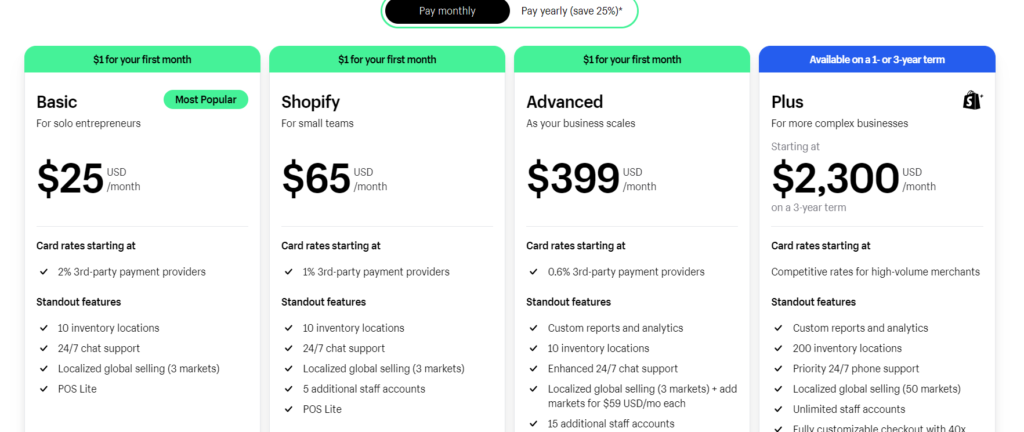
Shopify: Shopify offers a tiered pricing plan, with monthly fees ranging from USD$25 to USD$399. These plans come with varying bandwidth allowances, storage capacities, and included features. Additionally, Shopify levies transaction fees on each sale, typically ranging from 0.6% to 2% depending on your pricing plan.
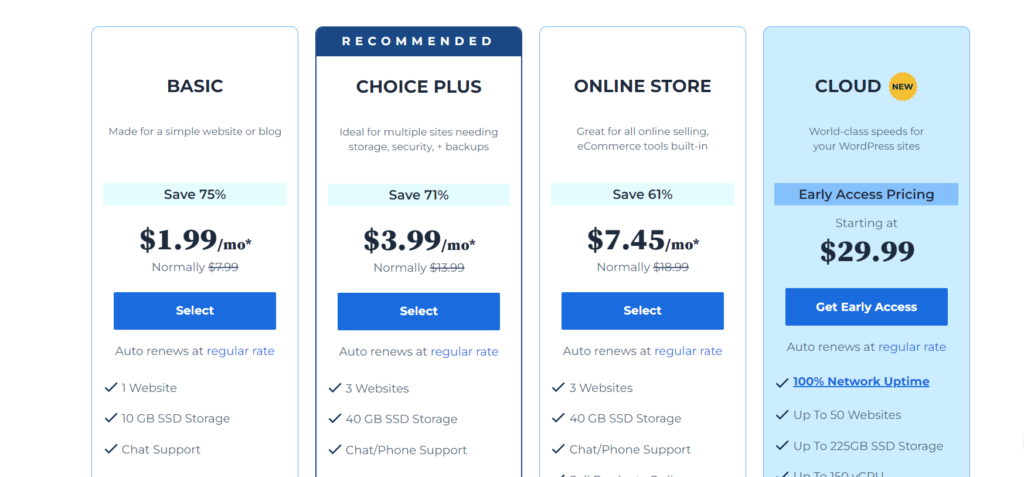
WooCommerce: WooCommerce itself is free to download and use. However, it necessitates WordPress hosting, which can range from a few dollars to tens of dollars per month depending on the plan you choose. You’ll also need to factor in the cost of a domain name, a premium theme (if desired), and any additional plugins you require. While WooCommerce offers greater flexibility in terms of cost management, it requires a more proactive approach to managing your store’s technical infrastructure.
Scalability: WooCommerce vs. Shopify
As your business flourishes, your ecommerce platform needs to adapt and evolve alongside it. Both Shopify and WooCommerce provide scalability to accommodate your growth aspirations.
- Shopify: Shopify’s tiered pricing structure readily accommodates businesses of all sizes. As your sales volume increases, you can seamlessly upgrade to a higher plan with increased bandwidth, storage, and features. Shopify also offers a robust app store brimming with third-party integrations that can extend the functionality of your store and empower you to cater to more complex business needs.
- WooCommerce: WooCommerce’s inherent flexibility empowers you to scale your store to virtually any size. You can leverage a vast array of themes and plugins to add functionalities, enhance your store’s design, and integrate with various marketing, sales, and shipping tools. However, scaling a WooCommerce store effectively necessitates a strong technical aptitude or the assistance of a developer.
Customization: WooCommerce vs. Shopify
For businesses seeking a highly customized online store experience, WooCommerce reigns supreme. As a WordPress plugin, WooCommerce integrates seamlessly with the WordPress ecosystem, granting you access to a vast repository of themes and plugins. These themes and plugins empower you to tailor the look, feel, and functionality of your store to precisely match your brand identity and cater to your specific business requirements.
Shopify offers a reasonable degree of customization through its theme store and app store. However, the level of customization is inherently limited compared to WooCommerce. If you envision a highly unique and bespoke online store, WooCommerce provides a more suitable platform.
Payment Processing: WooCommerce vs. Shopify
Both platforms provide a selection of payment gateways to facilitate secure transactions on your online store
Shopify: Shopify integrates with a wide range of popular payment processors, including Shopify Payments, Stripe, PayPal, and more. Transaction fees may vary depending on the chosen payment gateway.
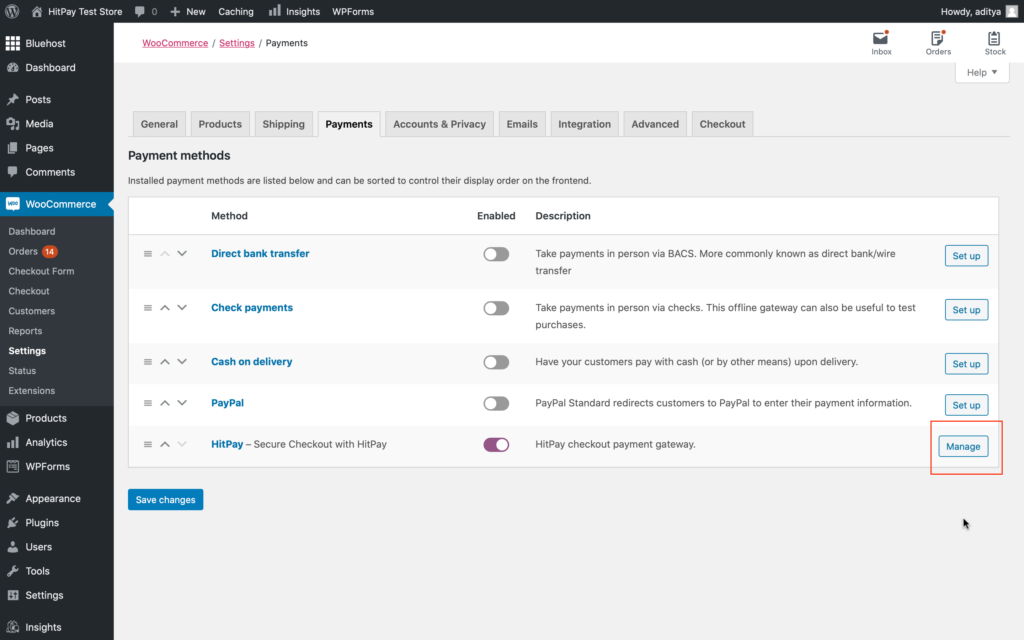
WooCommerce: WooCommerce offers a broader selection of payment gateways through third-party plugins. While this flexibility empowers you to choose the most cost-effective option for your business
Sales Features: Inventory Management – Shopify vs. WooCommerce
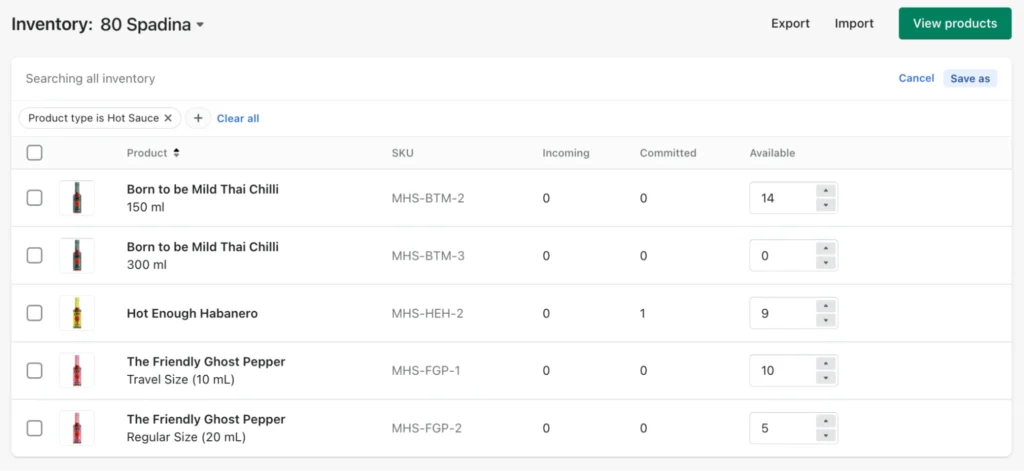
Shopify
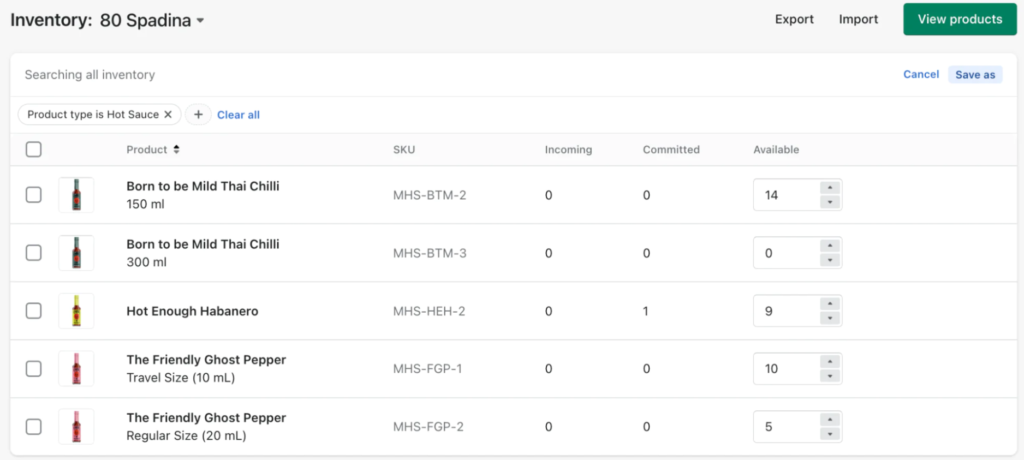
- Robust built-in features: No need for additional plugins for advanced inventory management.
- Streamlined workflows: Bulk editing, low stock alerts, and comprehensive reports for efficient inventory control.
- Improved customer experience: Showcase product variations and offer larger bundles for better product presentation.
- Winter ’24 updates: Automatic categorization saves time and improves organization.
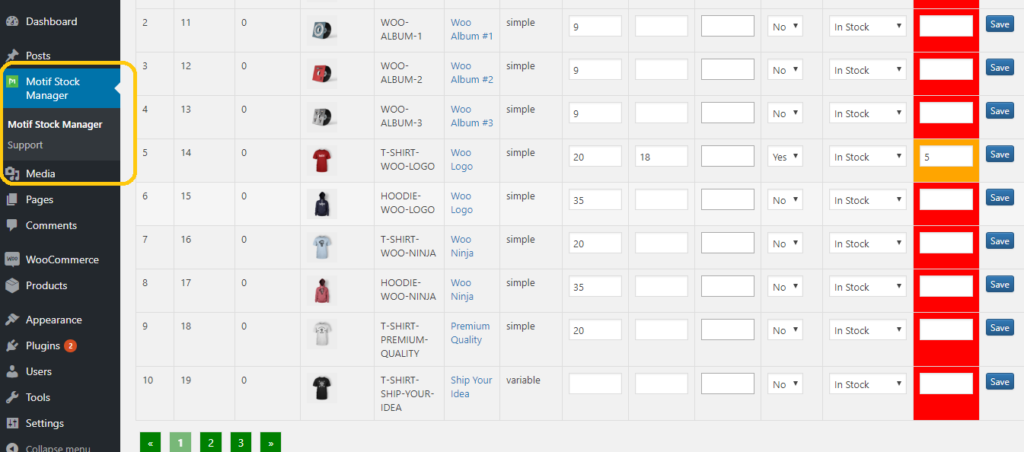
WooCommerce
- Limited built-in features: Requires plugins to achieve similar functionality as Shopify’s built-in features.
- More manual processes: Bulk editing and inventory reports might require additional plugins.
- Customization potential: Plugins offer extensive customization options for inventory management.
- Lower barrier to entry: Free and paid plugins cater to various budget needs.
WooCommerce vs. Shopify : A Clear Advantage
While WooCommerce offers basic inventory management features, Shopify provides a more comprehensive and user-friendly solution that scales with your business. Shopify’s built-in features eliminate the need for additional plugins, saving you time and money. Automated functionalities and insightful reports empower you to make data-driven decisions and optimize your inventory for success.
Top Ecommerce Security: WooCommerce vs. Shopify
Security: A Shared Responsibility
In today’s digital world, robust security is non-negotiable for any online store. This goes for both merchants protecting their business data and customer information, and for buyers ensuring their personal details and financial transactions are safe.
Shopify: Security Built-In
As a dedicated e-commerce platform with thousands of stores under its wing, Shopify prioritizes security. This makes it a strong contender for merchants seeking a secure platform. Here’s why:
- Out-of-the-Box Security: Even with the most basic Shopify plan, you get essential security features like:
- Default SSL Certificates: This encrypts data transfer between your store and customers, safeguarding sensitive information.
- Fraud Analysis Tool: Shopify proactively monitors for suspicious activity to minimize the risk of fraudulent transactions.
- 2-Factor Authentication (2FA): This extra layer of login security adds a code requirement, making unauthorized access more difficult.
- Dedicated Login Areas: Manage all your security settings conveniently in one centralized location.
WooCommerce: Security Requires More Effort
While WooCommerce offers some security features like 2FA for admin accounts, it requires more user involvement to achieve a comprehensive security posture:
- Self-Managed Security: The onus falls on you to identify and implement additional security measures to protect your store.
- Finding a Secure Host: You’ll need to research and choose a reputable ecommerce hosting provider with robust security features, including SSL certificates (a must-have for any online store). WooCommerce itself recommends Bluehost as a secure hosting option.
- Security Plugins: Several popular WooCommerce plugins provide comprehensive security solutions like Jetpack, Shield Security, Sucuri Security, Security Ninja, and Wordfence Security. These require research, installation, and ongoing maintenance.
The Takeaway: Peace of Mind with Shopify
The additional research and management required for WooCommerce security can be time-consuming. Shopify, with its built-in security features, offers a more streamlined and user-friendly approach. This can give you greater peace of mind knowing your store and customer data are well-protected.
Choosing the Right Ecommerce Platform: A Feature-Based Guide
Selecting the best ecommerce platform for your online store can feel overwhelming. This guide explores key features to consider based on your specific needs, helping you navigate this critical decision.
Scalability: Building for the Future
If long-term growth is your vision, consider these essential features:
- Robust Inventory Management: Look for a platform with built-in tools for handling large inventory volumes. This might include features like bulk editing, low stock alerts, and comprehensive inventory reports.
- Product Variants: Ensure the platform allows you to create product variations in multiple styles, sizes, or colors. This caters to a wider range of customer preferences and boosts product discovery.
- Flexible Shipping Options: Global shipping capabilities with discounted rates are crucial for reaching a broader audience. Consider platforms that offer integrations with leading shipping providers.
- Advanced Analytics: As your business grows, in-depth analytics become more important. The platform should handle large data sets from website visitors, providing insights into customer behavior and purchase patterns.
Ease of Use: A Smooth Setup Experience
A user-friendly platform streamlines the setup process and ongoing management of your store. Look for these features:
- Pre-made Templates: A library of professionally designed templates allows you to get started quickly without extensive design knowledge.
- Intuitive Store Editor: The platform should offer a user-friendly editor with drag-and-drop functionality for easy customization of your store’s layout and design.
- Responsive Customer Support: Reliable and readily available customer service is invaluable for resolving technical issues and ensuring a smooth setup process.
- Built-in Security Measures: The platform should offer built-in security features like SSL certificates and fraud analysis tools to protect your store and customer data.
Cost Considerations: Managing Your Budget
While upfront costs are important, consider ongoing expenses associated with your chosen platform:
- Free Extensions and Themes: Free options can reduce ongoing costs, but explore the features available and ensure they meet your needs.
- Pricing Plans: Evaluate the features offered by different plan tiers and select a plan that provides the functionalities you need at a reasonable price. Look for special offers or discounts on annual subscriptions.
- Transaction Fees: Understand the platform’s transaction fees associated with each sale. These can impact your profit margins so choose a platform with competitive rates.
Marketing Features: Growing Your Customer Base
Effective marketing is crucial for attracting new customers and growing your business. Explore platforms that offer:
- Social Media Integration: Seamless integration with popular social media platforms allows you to promote your products directly and engage with your audience.
- SEO Tools: Search engine optimization (SEO) features help your store rank higher in search engine results, increasing organic website traffic.
- Email Marketing Tools: Built-in email marketing tools allow you to create and send targeted email campaigns to promote new products or special offers.
- User Behavior Tracking Tools: Track website visitor behavior to understand user journeys and optimize your store layout and product offerings based on customer preferences.
By considering these key features and aligning them with your specific business needs, you can make an informed decision and select the ecommerce platform that empowers you to achieve your online selling goals.
Launch your dream online store with Vuetech Shopify or WooCommerce packages! We even offer government subsidy grants to help reduce the cost. Considering migrating Woocommerce to Shopify? Vuetech can help with that too! Get all the details here
]]>
In today’s digital marketing landscape, the battle against click fraud is more important than ever. Click fraud will drain a company’s advertising budget, disrupt the flow of companies campaign data, and prevent businesses from reaching the correct target audience. To ensure the success of businesses online advertising efforts, it is crucial to have a guaranteed prevention strategy for click fraud. Fortunately, in this article, we will explore effective ways to protect your advertising investment and efforts from the threat of click fraud.
The Meaning of Click Fraud
Before we delve into prevention strategies, let’s clarify what click fraud is. Click fraud occurs when an individual or automated bot intentionally clicks on your online ads without any genuine interest in your products or services. The motivations behind click fraud can vary, but the end result is the same which is they want to waste your advertisement budget, reduced ROI, and compromise campaign performance which can really hinder a company’s performance.
The Solution for Click Fraud
ClickCease is a digital marketing tool that enables businesses to take control of their online advertising campaigns by providing insights and protection that the businesses need to make every click worth it. ClickCease helps businesses of all sizes and industries to maximize the effectiveness of their pay-per-click (PPC) campaigns which makes it a popular brand for all types of businesses.
What does Clickcease do?
ClickCease protects businesses by preventing fraudulent clicks and ensuring that the business ad spend is invested wisely. ClickCease doesn’t stop at just click fraud protection, ClickCease also equips businesses with comprehensive tools to fine tune their campaigns, provide insights for businesses, and maximize the return on investment for businesses.
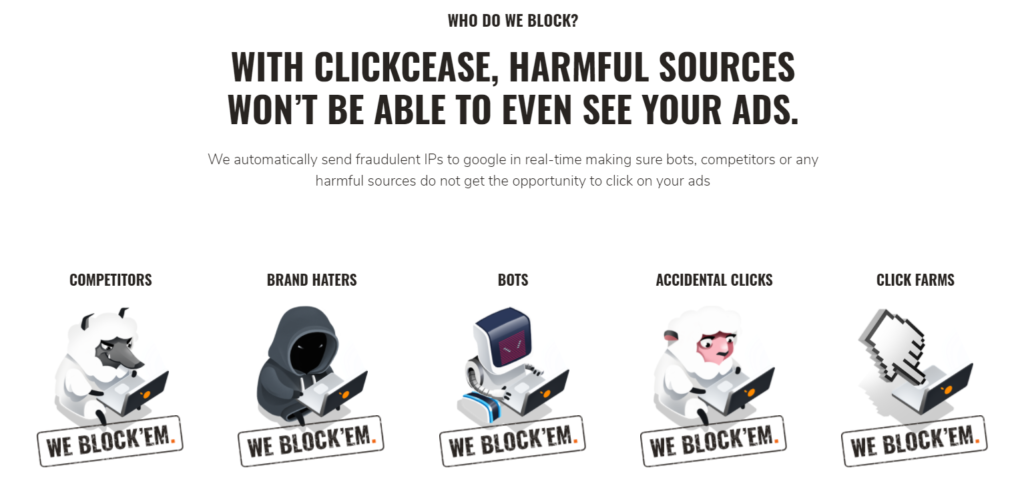
How ClickCease safeguards both you and your business?
ClickCease blocks harmful sources from wasting businesses ad spend. For example, Competitors click on your advertisement multiple times and wasting your advertising budget, with ClickCease on your Google Ads account, it will report to Google about the fraudulent clicks and Google will help resolve it and return you the money, this process will save businesses or clients a substantial amount of money which makes ClickCease one the most useful digital marketing tool out there.
What are ClickCease Advantages?

Real-time Click Fraud Detection:
ClickCease monitors your ad campaigns on Google Ads and Facebook Ads 24/7, analyzing every click in real-time. It uses advanced algorithms to identify patterns that indicate potential fraudulent activity.
Automated Blocking:
The moment ClickCease detects any suspicious activity, it will take action by automatically blocking the IP addresses associated with click fraud, preventing them from draining your advertising budget.


Detailed Reports:
ClickCease also provides comprehensive reports that allow you to gain insights into your campaigns and the extent of click fraud. This data gives you more understanding in making informed decisions and optimize your advertising spend.
Customizable Settings:
ClickCease is flexible and gives the user substantial amount of freedom for them to customize ClickCease to their specific outcome. You can set custom rules and preferences to ensure that only real people clicks reach your website.
Cost Savings:
By preventing click fraud, ClickCease helps businesses and clients save a substantial amount of money. You get more value from your advertising budget, as it is no longer being wasted on fake clicks.
Easy Integration:
ClickCease is able to integrate smoothly to popular advertising platforms, making the setup process straightforward for both beginners and experienced advertisers which is always a welcome edition that ClickCease implemented.
Why ClickCease Matters
Click fraud will have a significant impact on your advertising efforts. It will result in inflated costs, reduced ROI, and ruin the performance metrics. ClickCease protects your investment, ensuring that your marketing budget is spent on actually attracting real customers who are interested in your advertisements.
In nowadays competitive online landscape, ClickCease provides statistics for you to focus your resources where it matters most, allowing you to grow your business efficiently. By preventing click fraud, you can trust that your advertising campaigns are working for you, not against you.
Don’t let click fraud erode your advertising budget and hinder your online success. With ClickCease, you can protect your online advertising efforts and maintain a strong presence in the digital marketplace. Try ClickCease today and enjoy the peace of mind that comes with knowing your ad campaigns are protected.
]]>
What is a CRM?
Customer Relationship Management, or CRM for short, is an software system that manages a company’s relationship and interaction with customers by storing and organizing their information.
The substantial influence of CRM’s role.
It is a combination of practices, strategies and technologies that oversee and analyse the interaction to improve customer relationships, enhance customer satisfaction, and ultimately drive business growth making it an exceptionally versatile software system that can be implemented in various industries, including retail, healthcare, finance, and more. Thus, making it play a crucial role in fostering better relationships with customers and prospects.
What are the characteristics that makes an excellent CRM platform?
As every business possesses distinct requirements within the CRM software domain, the characteristics that were chosen best encompassed the requirements across the board as these are components of CRM platform exceptional.
The primary testing classifications used for testing CRM systems are:
- User-Friendly Interface: The CRM platform should be able to feature an intuitive and have a easily navigable interface, enabling users to swiftly access and edit customer data. If the learning curve is steep, it might hinder on its adoption and discourage users from employing it.
- Features: The CRM platform should have the functionalities and capabilities provided by the CRM software which encompassing components such as contact management, tracking leads and opportunities, customer segmentation, task and activity management.
- Customization: The CRM platform should allow users to customize fields, workflows, and reports to align with the individual or organizational needs as it encompasses the flexibility and versatility of the CRM platform.
- Scalability: The CRM platform should have ability to grow or expand without a significant drop in performance or the need for a complete redesign which makes scalability a crucial part in any CRM.
- Pricing: The expenses related to the utilization of CRM software that encompass elements like licensing costs, subscription packages, and supplementary fees for extra modules or functionalities.
- Customer Support and Service Tools: The CRM platform have to incorporate customer support functionalities such as ticketing systems, knowledge bases, and case management to improve customer service.
The Best 5 Customer Relationship Management Platforms are:

1. Less Annoying CRM
Less Annoying CRM is a straightforward, cost-effective CRM platform designed for small businesses, offering essential features to manage contacts and interactions with customers while prioritizing ease of use and customer support.
What contributes to its widespread popularity?
Less annoying CRM is a popular CRM software choice that has been constructed from the foundation to be suitable for small businesses and organizations primarily due several key contributors. For example, Less annoying CRM is widely known for being one of the easiest CRM to use which makes it to appeal to more newer customers that are starting to use a CRM. It only has one pricing with no price creep, making this CRM appeal to all types of people.
Pricing
| Plan | Monthly Price |
| Standard | $15/month |
Pros
- Easily understandable UX
- No Upcharges
- No Price Creep
- Funded by Customers which means there is no need to resort to unethical practices that causes problems to the customers in order to generate profits.
Cons
- Integration Issues
- Lack of customization
- Longer loading times
- Base price is on the more expensive side
2. Hubspot

HubSpot is an all-in-one inbound marketing, sales, and customer service platform designed to help businesses attract, engage, and delight customers.
What contributes to its widespread popularity?
Hubspot offers a suite of integrated tools and features for marketing automation, content management, customer relationship management, social media management, and many more.
HubSpot encourages businesses to create, manage, and optimize their digital marketing efforts, drive leads, nurture customer relationships, and grow their businesses as a whole.
Thus, making it a very adaptable and versertile CRM as it has a large disposal of tools, which makes it more accommodating for businesses.
Pricing
| Plan | Monthly Price | Annually Price |
| Free Tools | Free | Free |
| Starter | $28/month | $26/month |
| Professional | $1,246/month | $1,120/month |
| Enterprise | – | $5,100/month |
Pros
- Huge feature set and mature integration
- Have a Free Plan
- Ease of use
- Huge disposal of tools dedicated to different industries
- Educating users
- Highly respected marketing automation tool in the industry
Cons
- Expensive Prices
- Steep Price Creep
- Tools offered in the paid plan can be found free on other CRM
- Need to pay for Technical Support
- Requires a 12 month contract
- Onboarding fees
3. ClickUp

ClickUp serves as a comprehensive productivity platform, acting as a central hub where teams converge to strategize, arrange, and engage in collaborative work through features like tasks, Docs, Chat, Goals, Whiteboards, and additional tools.
What contributes to its widespread popularity?
It offers a wide array of features, including task management, document collaboration, real-time chat, goal tracking, whiteboards, and more.
ClickUp stands out for its user-friendly interface and high degree of customization, allowing teams to tailor it to their unique needs.
This makes ClickUp the most customizable CRM and it provides a range of customization options that allow users to adapt the platform to their specific workflows and preferences.
Pricing
| Plan | Monthly Price | Annually Price |
| Free | Free | Free |
| Unlimited | $7/month | $10/month |
| Business | $12/month | $19/month |
Pros
- Free Plan
- Unlimited Users
- Unlimited Tasks
- Unlimited Storage
Cons
- Not User-Friendly
- Steep Learning Curve
- Slow
- Few Bugs
4. Salesforce Sales Cloud

Salesforce Sales Cloud is a comprehensive customer relationship management platform designed to encourage sales teams and businesses in managing leads, opportunities, and customer relationships effectively.
What contributes to its widespread popularity?
Salesforce Sales Cloud is known for its scalability and customization options with the ability to provide a 360-degree view of customer interactions.
Salesforce Sales Cloud aims to streamline sales processes, increase productivity, and drive revenue growth for organizations across various industries by having better automation and analytics than other CRMs.
Hence, Salesforce Sales Cloud’s CRM is best suited for growing businesses that require detailed campaign revenue data, and smaller companies are suggested avoid Salesforce, given its robust capabilities come with a premium cost and the smaller businesses might lack the resources in inquiring their services.
Pricing
| Plan | Monthly Price for Each User |
| Starter | $25/month |
| Professional | $80/month |
| Enterprise | $165/month |
| Unlimited | $330/month |
| Unlimited+ | $500/month |
Pros
- High customizable
- User-Friendly
- Well designed
Cons
- Expensive
- Constantly Changing making it complex
- Steep Learning Curve
- Slow
5. Monday Sales CRM

Monday Sales CRM is a specialized sales solution designed to empower business proprietors and sales team in overseeing the complete sales journey, starting from initial interactions to post-sales activities.
What contributes to its widespread popularity?
It consolidates all customer information into a single, unified location, allowing for lead capture, efficient communication management, automation of repetitive tasks, and meticulous monitoring of every deal’s progress to prevent any missed opportunities this makes it so that monday sales CRM meticulous and have the correct information for the users which is why it is so popular.
Pricing
| Plan | Monthly Price for each user |
| Basic | $10/month |
| Standard | $14/month |
| Pro | $24/month |
Pros
- Good at Keeping Track
- User Friendly
- Informative
Cons
- Slow
- Expensive
- Integration Issues
- Formatting Issues
Conclusion
In conclusion, while all of the Customer Relationship Management Platforms are great, there are distinct differences in all of of them. To sum up, the choice between each CRM is up to the businesses to decide on choosing them, but if there were one CRM to choose from the top 5, it would be Less Annoying CRM as the name states it is a CRM that provides more for the customers and not earn a profit from them. With its low prices and no price creep or upcharges, this makes it a bang for buck. Follow up by the user friendly interface which appeals to all types of businesses making it the best CRM there is.
]]>
What is Website Hosting?
Website hosting is a service that allows individuals and organizations to make their websites accessible on the internet. It involves storing the files, data, and content of a website on a specialized computer server known as a web server. These web servers are typically owned and managed by hosting providers.
Importance of selecting the correct website hosting service.
- Website Performance
- Reliability and Uptime
- Security
- Scalability
- Customer Support
- Backup and Data Recovery
- Technical Requirements
- Content Management Systems
- Cost Efficiency
- Search Engine Ranking
The Top 10 Website Hosting Services
1. Hostinger

Hostinger is a popular web hosting company known for its budget-friendly hosting services and user-friendly approach. Established in 2004, Hostinger has grown to serve millions of customers worldwide. The company offers a range of hosting solutions, including shared hosting, VPS hosting, and cloud hosting.
Pros
- Unmetered disk space and bandwidth on all plans
- Unlimited Free SSL
- Unlimited Bandwidth
- Free Email
- Free Domain Name
- Free Website Transfer Service
- 24/7 Support
Cons
- Limited Resources on Shared Hosting
- Additional Costs for Some Features
- No Traditional cPanel
- Higher Renewal Prices
- No Windows Hosting
What contributes to its widespread popularity?
Hostinger is a web hosting provider that consistently ranks among the top choices for hosting services. Its widespread recognition is driven by a combination of factors that appeal to a diverse range of users.
Moreover, Hostinger’s scalability options accommodate the growth of websites over time, making it a versatile choice for various online projects. The inclusion of a free website builder and WordPress optimization options adds to its user-friendliness.
However, Hostinger, like any hosting provider, is not without its limitations. Users with resource-intensive websites or unique hosting requirements may find the available features and customization options somewhat restricted.
Lastly, the choice of Hostinger as a hosting provider should align with your specific website needs, budget constraints, and long-term objectives. Hostinger’s combination of affordability and performance makes it a compelling option for many users seeking reliable and cost-effective web hosting services.
On Hostinger’s Website
2. Hostgator

HostGator is a reputable web hosting provider known for its reliability and versatility in hosting solutions. Founded in 2002, HostGator offers a wide range of hosting services to cater to different website needs, from individuals and small businesses to large enterprises.
Pros
- Unmetered disk space and bandwidth on all plans
- Free domain name
- Free Email
- Free SSL certificate
- Free website transfer service
- 24/7 Support
Cons
- Renewal Prices
- Overcrowded Servers
- Upselling and Additional Costs
- Migration Fees
- Complicated Cancellation Process
- Control Panel Limitations
- Resource Limitations on Shared Hosting
What contributes to its widespread popularity?
HostGator is a well-established web hosting provider that offers a diverse range of hosting solutions to cater to a wide variety of users, from individuals and small businesses to larger enterprises. HostGator’s strengths lie in its user-friendly control panel, a robust uptime guarantee, and a wide array of hosting options.
The provider’s cPanel interface simplifies website management, making it accessible to users of all experience levels. Additionally, HostGator’s 99.9% uptime guarantee ensures that websites remain accessible to visitors nearly continuously.
HostGator’s scalability options allow websites to grow over time, providing flexibility and room for expansion. The inclusion of performance optimization measures, such as SSD storage and a content delivery network (CDN), contributes to fast loading speeds and reliable performance.
In the end, HostGator’s suitability as a hosting provider depends on your specific website requirements, budget constraints, and long-term goals.
On Hostgator’s Website
3. BlueHost

Bluehost is a top-rated web hosting provider that offers reliable and affordable website hosting plans with easy-to-use tools. Founded in 2003, Bluehost has a strong presence in the hosting industry and hosts millions of websites worldwide. With 24/7 customer support, domain name registration, and specialized WordPress and WooCommerce hosting options, Bluehost is a great choice for individuals and businesses looking to launch a successful website.
Pros
- Free domain name
- Free SSL certificate
- Free business email
- Includes a CDN
- Plans include pro features such as client invoicing, staging and insights
- 24/7 support
Cons
- Price triples upon renewal
- Limited storage
- Must pay for automated backups
- No phone support on its Basic plan
- Upselling
- Complex Refund Policy
- Complex Website Migrations
- Storage Restrictions
What contributes to its widespread popularity?
Bluehost is a top-rated web hosting provider with a reputation for reliability and a range of hosting services suitable for a broad spectrum of users, from individuals to small businesses and beyond. Bluehost’s strong points include its user-friendly interface, robust uptime record, and a variety of hosting options that cater to different needs.The user-friendly cPanel interface simplifies website management, making it accessible to users with varying levels of technical expertise.
Nonetheless, it’s essential to consider Bluehost’s potential drawbacks, such as pricing for renewals, resource limitations on shared hosting, and the complexity of the refund policy. Users should carefully assess their unique hosting requirements and budget constraints when considering Bluehost as a hosting provider.
Finally, Bluehost’s suitability as a hosting solution depends on how well it aligns with your specific website needs, goals, and expectations. It has earned a solid reputation in the hosting industry, but making an informed decision involves evaluating these factors and considering alternatives as well.
On BlueHost’s Website
4. DreamHost

DreamHost is a reputable web hosting company known for its commitment to openness, reliability, and performance. Established in 1997, DreamHost is reliable and affordable with feature-rich plans that include everything you need to build a new website, from a domain name and SSL certificate to one-click WordPress installation. In addition to its great value for the price, it also offers a beginner-friendly site builder and, best of all, very helpful support that is there no matter the type of issue you are having with your hosting or site.
Pros
- Affordable plans starting at $2.59 per month
- Free domain name and SSL certificate
- One-, three-, 12- and 36-month contract lengths available
- Long 97-day money-back guarantee
- 100% uptime guarantee
- Top-notch support
Cons
- Pricing increases upon renewal
- Lots of upsells in checkout
- Cheapest plan doesn’t include a custom domain
- Must pay for its unlimited plan for email
What contributes to its widespread popularity?
DreamHost is a web hosting provider that stands out for its unique features and commitment to openness in the hosting industry. With a focus on open-source technologies, strong website performance, and a dedication to sustainability, DreamHost offers a compelling hosting solution for a diverse range of users.
DreamHost’s support for popular open-source content management systems like WordPress, Joomla, and Drupal makes it an excellent choice for users who prefer to work with open-source software.
The variety of hosting services available, including shared hosting, VPS hosting, dedicated servers, and managed WordPress hosting, ensures that users can find a hosting solution that aligns with their website’s specific needs and scale as their websites grow.
Performance and speed are emphasized through the use of solid-state drives (SSDs), a content delivery network (CDN), and optimized server configurations, ensuring fast loading times and reliable website performance.
While DreamHost may have a unique control panel compared to the industry-standard cPanel, its user-friendly interface simplifies website management tasks for users of all experience levels.
Furthermore, DreamHost’s commitment to environmental responsibility by offsetting its carbon footprint with renewable energy credits makes it an eco-conscious hosting choice.
The 97-day money-back guarantee allows users to try DreamHost’s hosting services with reduced financial risk, demonstrating the company’s confidence in its offerings.
On DreamHost’s Website
5. Inmotion Hosting

InMotion Hosting is a renowned web hosting provider known for its reliable and feature-rich hosting services. Established in 2001, InMotion Hosting has a long history of serving a diverse range of customers, from individuals and small businesses to larger enterprises. It stands out for its ultra-low pricing, reliability and security. It offers a long, 90-day money-back guarantee, automatic backups, DDoS protection and malware protection to help further safeguard your site and protect the sensitive information it processes, such as payment information and user data.
Pros
- Ultra-low long-term pricing
- Automatic backups available
- Comes with many security features
- Known for reliability
- 90-day money-back guarantee
- Highly rated 24/7 tech support
Cons
- Minimum 12-month contract on most plans
- Pricing increases upon renewal
- Domain name not included with its base plan
- Month-to-month billing only available in highest-tier plan
What contributes to its widespread popularity?
InMotion Hosting’s strengths include its emphasis on website performance, featuring solid-state drives (SSDs), high-speed data centers, and optimization technologies that ensure fast loading times and consistent website performance.
The user-friendly cPanel control panel simplifies website management tasks, making it accessible to users of varying technical expertise. Additionally, InMotion Hosting provides 24/7 customer support through multiple channels, including phone, live chat, email, and a comprehensive knowledge base, offering assistance when needed.
Security is a priority, with InMotion Hosting offering robust features such as DDoS protection, free SSL certificates, automatic backups, and malware scanning to enhance website security and protect user data.
InMotion Hosting’s versatility is evident in its hosting solutions, including shared hosting, VPS hosting, dedicated servers, and specialized hosting for WordPress and e-commerce platforms. This diversity allows users to select hosting plans that align with their unique website requirements.
However, as with any hosting provider, it’s essential to carefully evaluate how well InMotion Hosting’s features and services match your specific website needs and goals. InMotion Hosting’s reputation for reliability and performance, combined with its variety of hosting options, makes it a compelling choice for those seeking a dependable web hosting solution.
On Inmotion Hosting’s Website
6. SiteGround

SiteGround is a renowned for its fast hosting solutions and top-notch customer care, known for its high-performance hosting services and excellent customer support. Established in 2004, SiteGround has gained a strong reputation in the hosting industry and serves millions of users worldwide.
Pros
- High Performance
- Exceptional Customer Support
- User-Friendly Control Panel
- Specialized WordPress Hosting
- Scalability
- Free Website Migration
- Money-Back Guarantee
- Developer-Friendly Features
- Innovative Technologies
Cons
- Pricing Increases
- Limited Storage
- Resource Limits
- Data Transfer Limits
- No Free Domain
- Less Specialized Hosting
- Lack of Windows Hosting
- Limited Storage Backup
What contributes to its widespread popularity?
SiteGround is a highly distinguished web hosting provider known for its performance, exceptional customer support, and user-friendly features. With a focus on speed, security, and reliability, SiteGround has earned a famous reputation in the hosting industry.
Security is a priority, with SiteGround offering robust measures such as automated daily backups, a web application firewall, free SSL certificates, and malware scanning to protect websites and user data.
The hosting provider’s commitment to performance optimization, WordPress specialization, and developer-friendly features make it a compelling choice for a wide range of users, including beginners and experienced developers.
When evaluating SiteGround as a hosting provider, it’s crucial to assess how well its features and services align with your unique website requirements, budget constraints, and long-term goals. Conducting thorough research and comparing hosting options will help you make an informed decision that best suits your needs.
On SiteGround’s Website
7. GoDaddy

GoDaddy is a prominent and widely recognized web hosting and domain registrar company. Established in 1997, GoDaddy is the best web hosting service for businesses that need an easy setup and don’t require a lot of storage. It’s also ideal for setting up WordPress websites, as it offers one-click installation and daily backups. Plus, its plans include a free SSL certificate to keep your site secure. With its DDoS protection, it also offers an added layer of protection against malicious attacks.
Pros
- Pricing doesn’t increase upon renewal
- One-click setup of more than 150 apps
- Includes daily backups
- Beginner-friendly website builder
- Has data centers in North America, Asia-Pacific and Europe
Cons
- Limited storage
- Storage limits
What contributes to its widespread popularity?
GoDaddy is a prominent and widely recognized web hosting and domain registrar company that has established itself as a major player in the industry since its inception in 1997. The company is known for offering a variety of services, with a strong focus on domain registration, web hosting, and website-related tools and features.
GoDaddy’s strengths lie in its user-friendly website builder, domain registration services, and a marketplace for domain and website auctions. It also provides a range of hosting solutions, including shared hosting, VPS hosting, dedicated servers, and specialized hosting for WordPress and e-commerce websites.
GoDaddy is also recognized for its marketing efforts, making it a well-known brand in the industry. Customer support is available through multiple channels, ensuring users can obtain assistance when needed.
When considering GoDaddy as a hosting provider, it’s crucial to assess how well its services align with your specific website requirements, budget constraints, and long-term objectives. Conducting thorough research and comparing hosting options will help you determine whether GoDaddy is the right choice for your web hosting and domain registration needs.
On GoDaddy’s Website
8. Hostwinds

Hostwinds is a web hosting provider known for its versatile and customer-focused hosting solutions. Founded in 2010, Hostwinds is one of the few web hosting providers that includes unlimited storage and bandwidth with every plan, making it the best web hosting service for content-heavy sites.
Pros
- Low-cost plans start at $3.74 per month (with 36-month contract)
- Multiple contract lengths available (one month to 36 months)
- Unlimited storage and bandwidth on all plans
- Free SSL certificate
- Unlimited business email included
Cons
- Pricing Complexity
- No Free Domain
- Limited Global Presence
- No Managed WordPress Hosting
- No Windows Hosting
- Limited Specialization
- No Free Website Builder
What contributes to its widespread popularity?
Hostwinds is a versatile web hosting provider that offers a wide range of hosting solutions, prioritizing performance, flexibility, and customer support. Since its establishment, Hostwinds has gained recognition for its commitment to meeting the diverse needs of website owners, from individuals to businesses of all sizes.
Hostwinds’ strengths include its variety of hosting options, performance-focused infrastructure, exceptional customer support available 24/7, and an industry-leading uptime guarantee. Users can benefit from user-friendly control panels, robust security measures, scalability options, and specialized hosting plans tailored to platforms like WordPress.
On Hostwinds’s Website
9. InterServer

InterServer is a antiquated web hosting provider known for its high-quality hosting services and affordability. Founded in 1999, provides a lot of tools with a number of useful features that help keep a website secure and protected. For example, plans include InterShield Security to help protect your site from web attacks, and it also has an in-house malware database, a machine learning firewall and an automatic virus scanner so the health of your site is always upheld.
Pros
- Unlimited storage on all plans
- Free Cloudflare CDN
- Includes InterShield Security
- Weekly backups included
- Free unlimited business email
- Includes a WordPress installer
- Free website migration service
Cons
- Does not include a free domain name
- Dated cPanel
- Live chat can be slow to respond
What contributes to its widespread popularity?
While InterServer may not offer the same range of specialized hosting services or advanced features as some competitors, its affordability and commitment to reliability make it a compelling choice for individuals and small businesses.
This makes it so that when considering InterServer as a hosting provider, it’s essential to assess how its offerings match your specific website requirements, budget constraints, and long-term objectives. Conducting thorough research and comparing hosting options will help you determine if InterServer is the right fit for your hosting needs.
On InterServer’s Website
10. A2 Hosting

A2 Hosting is a web hosting company known for its high-performance hosting solutions and exceptional customer support. Founded in 2003, A2 Hosting has established itself as a reliable and fast hosting provider catering to individuals, small businesses, and enterprise clients.
Pros
- High-Speed Performance
- 99.9% Uptime Guarantee
- Developer-Friendly Features
- Managed WordPress Hosting
- Green Hosting Initiatives
- Security Features
- Responsive Customer Support
- Money-Back Guarantee
- Variety of Hosting Options
- Transparent Pricing
Cons
- Pricing for Turbo Plans
- Limited Data Centers
- Resource Restrictions
- Complexity for Beginners
- Limited Free Backups
- Domain Registration Costs
- No Windows Hosting
What contributes to its widespread popularity?
A2 Hosting is a web hosting provider known for its emphasis on speed, reliability, and customer support. With a strong commitment to delivering high-performance hosting solutions, A2 Hosting has become a popular choice for individuals and businesses alike.
The pros of A2 Hosting include its exceptional speed, a 99.9% uptime guarantee, developer-friendly features, managed WordPress hosting options, green hosting initiatives, robust security measures, responsive customer support, and a generous money-back guarantee. These advantages make it an attractive option for those seeking a hosting provider that prioritizes website performance, security, and environmental responsibility.
Nevertheless, it’s essential to consider the cons associated with A2 Hosting, such as pricing for Turbo plans, limited data center locations, resource restrictions on shared hosting, renewal pricing, complexity for beginners, backup limitations, domain registration costs, and the absence of Windows hosting. These factors may impact your decision, depending on your specific needs and budget.
On A2 Hosting’s Website
Comparison between the Companies
Company
Starting Price
Storage
Bandwidth

$2.99 per month
100GB of storage
Unlimited
$2.75 per month
Unmetered
Unmetered
$2.95 per month
10GB of storage
Unmetered
$2.59 per month
50GB of storage
Unlimited
$2.29 per month
50GB of storage
Unlimited
$2.99 per month
10GB of storage
Unmetered
$5.99 per month
10GB of storage
Unmetered
$5.24 per month
Unlimited
Unlimited
$2.50 per month
Unlimited
Unlimited
$2.99 per month
100GB of storage
Unmetered
Introduction To Comparison Of the 3 Hosting Websites
In This Article, We will Have a comparison what is the best Hosting Website for anyone looking to establish an online presence, whether it be for a personal blog, a small business website, or a large e-commerce platform, having a reliable web hosting provider is essential for these Things. Among the numerous hosting options available, three names consistently stand out for their quality services and diverse offerings: Hostinger, Bluehost, and SiteGround. Each of these providers has its own unique strengths and features that cater to a wide range of users.
Overview Of Hostinger

They are a well-established web hosting provider known for it’s pricing and performance. Founded in 2004, the company has expanded globally and currently serves millions of customers worldwide. Hostinger offers a range of hosting services, including shared hosting, cloud hosting, VPS hosting, and WordPress hosting, catering to individuals, small businesses, and developers alike.
They are on a mission to make online success possible for anyone from developers to aspiring bloggers and business owners. With their fast web hosting technology, reliable and friendly Customer Success agents, and easy-to-operate hPanel, growing your website is nothing short of effortless.
Started as a Lithuania-based tech startup in 2004, They are now a leading Web Hosting solutions provider, serving over a million web creators from 150+ countries.
Staying true to their reputation as the fastest-growing hosting brand of 2020*, they will continue to improve their services, unlock new markets, and even become a part of even more successful stories.
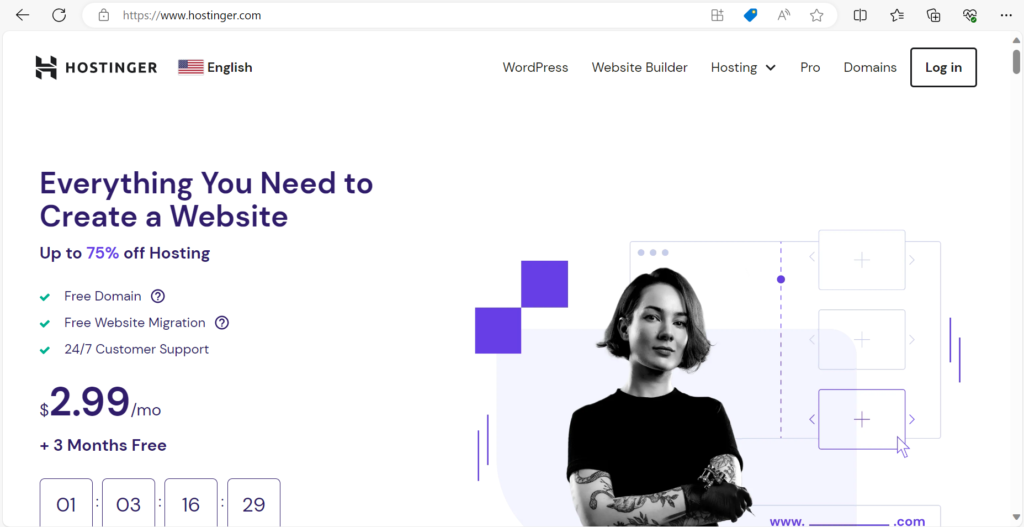
Key Features and Highlights:
- Affordable Hosting: Is famous for its competitive pricing, making it a great choice for users with a budget.
- Variety of Hosting Plans: They provide a a great variety of hosting solutions, allowing customers to choose best plans for their needs, whether it’s a basic shared hosting account or a more robust VPS server.
- User-Friendly Control Panel: Employs a user-friendly custom control panel that simplifies website management and hosting settings.
- Performance Optimization: The company focuses on performance with features like LiteSpeed caching, SSD storage, and a global content delivery network (CDN), for faster website loading times.
- Security: Offers free SSL certificates, daily backups, and proactive server monitoring to enhance the security of hosted websites.
- Customer Support: They provide 24/7 customer support through live chat and a ticketing system, ensuring that assistance is available when needed.
- Uptime Guarantee: Offers a 99.9% uptime guarantee, assuring users that their websites will remain accessible to visitors.
- Website Builder: Includes a user-friendly website builder, making it easy for users to create and design websites without advanced technical skills.
- Global Presence: With data centers in multiple locations around the world, They allows users to select a server location that suits their audience’s geographic location, optimizing website performance.
Overview Of BlueHost
They are a well-established and highly regarded web hosting provider that has been serving customers since 2003. It is one of the hosting companies officially recommended by WordPress.org, emphasizing its strong compatibility with WordPress-powered websites. Bluehost has earned a reputation for reliability, performance, and excellent customer support, making it a popular choice for individuals, bloggers, small businesses, and even larger enterprises. It was one of the 20 largest web hosts and was even collectively hosting over 2 million domains at some point in time. They were among those studied in the analysis of web-based hosting services in collaborative online learning programs.
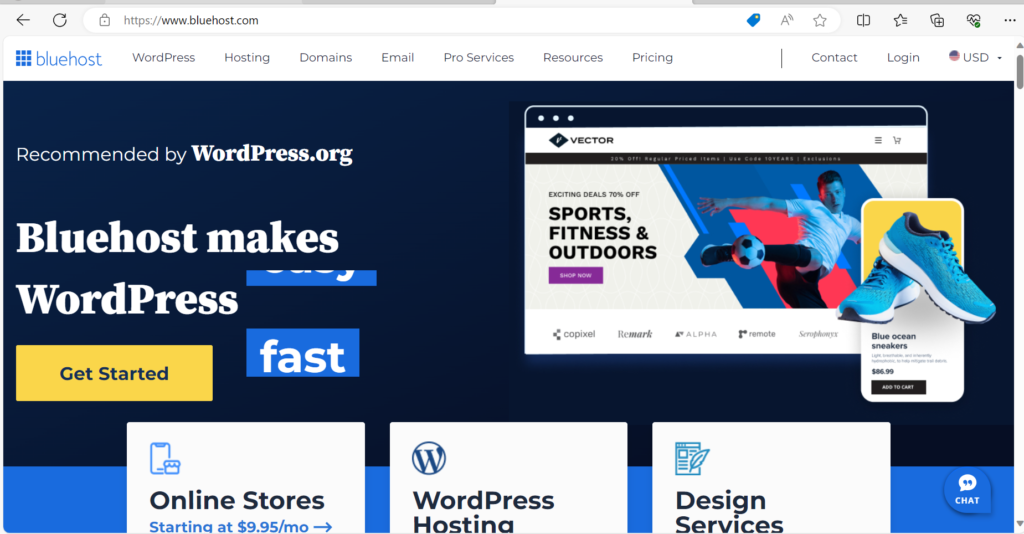
Key Features and Highlights:
- WordPress Integration: Offers seamless integration with WordPress, making it easy for users to set up and manage WordPress websites. They provide one-click WordPress installation and optimization.
- Variety of Hosting Plans: Provides a range of hosting solutions, including shared hosting, VPS hosting, dedicated hosting, and even managed WordPress hosting, catering to a wide spectrum of hosting needs.
- Performance: Invests in high-performance infrastructure, including SSD storage and a content delivery network (CDN), to ensure fast loading times and excellent website performance.
- Security Features: The company offers free SSL certificates, daily backups, and various security features to safeguard websites from threats and data loss.
- Customer Support: Provides 24/7 customer support through phone, live chat, and email. Their support team is known for its quick responses and helpfulness.
- Uptime Guarantee: Offers a 99.9% uptime guarantee, assuring customers that their websites will be available to visitors.
- Domain Services: Offers domain registration services, making it convenient to purchase and manage domains for your websites.
- Ease of Use: Has a user-friendly control panel that simplifies website management and hosting settings.
- Resource Scalability: Customers can easily upgrade their hosting plans as their websites grow, assured that they have the resources needed to handle increased traffic and demands.
OverView Of SiteGround
They are a well-regarded web hosting provider known for its exceptional performance, top-notch customer support, and strong emphasis on security. Founded in 2004, SiteGround has earned a reputation for being a reliable hosting choice for a wide range of users, from individuals to small businesses and developers. The company places a significant focus on delivering high-quality hosting services with a user-friendly approach. As of April 2023, it provides hosting for about 2,800,000 domains worldwide. It provides shared hosting, cloud hosting, enterprise solutions, email hosting, and domain registration. In 2019, the company employed about 500 people. It has offices in Sofia, Plovdiv, Stara Zagora and Madrid.
Key Features and Highlights:
- Performance Optimization: Is renowned for its speed-optimized hosting. They utilize SSD storage, content delivery networks (CDNs), and server-level caching to ensure fast loading times and excellent website performance.
- Strong Security: Takes security seriously, providing essential security features such as free SSL certificates, automatic daily backups, and proactive monitoring for threats and vulnerabilities.
- Customer Support: Offers exceptional 24/7 customer support through multiple channels, including live chat, phone, and ticketing. Their support team is known for its expertise and responsiveness.
- Variety of Hosting Plans: The company provides a range of hosting services, including shared hosting, cloud hosting, dedicated hosting, and specialized hosting for WordPress and WooCommerce. This caters to various hosting needs and website types.
- Ease of Use: Employs a user-friendly interface and a custom control panel that simplifies website management and hosting settings.
- Developer-Friendly Tools:Offers advanced developer tools, including SSH access, Git integration, and staging environments, making it suitable for experienced users and developers.
- Uptime Guarantee: Boasts a 99.9% uptime guarantee, assuring customers of reliable website availability.
- Global Data Centers: With data centers in multiple locations worldwide, They allows users to choose a server location that best suits their audience’s geographic location, enhancing website performance.
Similarities and Differences
Let’s summarize the similarities and differences between the three websites.
Similarities:
- Variety of Hosting Services: All three hosting providers offer a range of hosting services, including shared hosting, VPS hosting, and more, to cater to different hosting needs.
- User-Friendly Control Panels: Each hosting provider offer user-friendly control panels that make it easy to manage websites and hosting settings.
- Customer Support: All three providers offer 24/7 customer support through various channels, such as live chat, phone, and ticketing, ensuring assistance is available when needed.
- Uptime Guarantee: Each hosting provider offer uptime guarantees, assuring customers of reliable website availability (usually around 99.9%).
- Security Features: Each hosting provider prioritizes website security by offering free SSL certificates, daily backups, and proactive monitoring for threats.
- Domain Services: Each hosting provider provides domain registration services, making it convenient for customers to purchase and manage domains.
Differences:
- Pricing: Hostinger is known for its exceptionally cheap prices, making it the affordable option. The other two are relatively more expensive, particularly upon renewal.
- Performance: While all three providers offer good performance, SiteGround is renowned for its speed optimization and fast loading times. Bluehost is also focused on performance, especially for WordPress sites, while Hostinger offers solid performance at its competitive price point.
- WordPress Integration: Bluehost is officially recommended by WordPress.org and offers seamless WordPress integration. SiteGround is also known for its compatibility with WordPress. Hostinger supports WordPress but doesn’t have the same official endorsement.
- Developer-Friendly Features: SiteGround stands out for it’s “Easy to Understand” Tools, including SSH access, Git integration, and staging environments. The other two offer these features to a lesser extent.
- Global Data Centers: SiteGround has a strong global presence with data centers in various locations, allowing users to choose server locations strategically. The Other two also have multiple data center locations but may have a slightly smaller footprint.
- Renewal Prices: All three providers offer attractive introductory prices, but renewal prices can be significantly higher. Hostinger often maintains lower renewal prices compared to the other two.
Here’s a table summarizing the similarities and differences between Hostinger, Bluehost, and SiteGround:
| Feature | Hostinger | Bluehost | SiteGround |
| Variety of Hosting Plans | ✓ | ✓ | ✓ |
| User-Friendly Control Panel | ✓ | ✓ | ✓ |
| 24/7 Customer Support | ✓ | ✓ | ✓ |
| Uptime Guarantee | ✓ | ✓ | ✓ |
| Security Features | ✓ | ✓ | ✓ |
| Domain Services | ✓ | ✓ | ✓ |
| Pricing | Budget-Friendly | Competitive (but higher) | Competitive (but higher) |
| Performance Focus | Solid performance | WordPress-focused | Speed optimization |
| WordPress Integration | Supported | Officially recommended | Compatible |
| Developer-Friendly Tools | Limited | Moderate | Advanced |
| Global Data Centers | Multiple locations | Multiple locations | Strong global presence |
| Renewal Prices | Competitive | Higher than initial | Higher than initial |
Pros And Cons
Before comparing the pros and cons of each hosting provider, it’s important to remember that the ideal hosting provider depends on your unique needs and priorities. Each of these providers offers distinct advantages and drawbacks, so consider your budget, website requirements, and technical expertise when making your decision. Now, let’s delve into the pros and cons to help you make an informed choice.
| Web Provider | Pros | Cons |
| Hostinger | Affordable Pricing: Is known for its exceptionally low prices, making it a budget-friendly choice for hosting. Solid Performance: Despite its low cost, They offer reliable performance with features like SSD storage and LiteSpeed caching. User-Friendly: Hostinger’s control panel is user-friendly and suitable for beginners. Security: Provides essential security features like free SSL certificates and daily backups. Global Presence: They have data centers in various locations, allowing users to choose server locations strategically. | Limited Advanced Features: Some advanced features and tools may be lacking in lower-tier plans. Renewal Prices: Renewal prices can be significantly higher than initial promotional rates. |
| Blue Host | WordPress Integration: Is officially recommended by WordPress.org and offers seamless WordPress integration. Reliable Performance: Emphasizes performance, particularly for WordPress websites, and provides SSD storage. Customer Support: Their customer support is responsive and accessible. Security: Offers free SSL certificates, daily backups, and proactive monitoring. Variety of Hosting Plans: Provides a range of hosting options to meet different needs. | Higher Renewal Prices: Like Hostinger, renewal prices can be significantly higher than initial promotional rates. Limited Developer Features: While developer-friendly, it may have fewer advanced features compared to the other hosting websites. |
| Site Ground | Performance Optimization: Is known for its speed-optimized hosting with SSD storage and a global content delivery network (CDN). Strong Security: Provides robust security features, including free SSL certificates and daily backups. Exceptional Customer Support: Their customer support is highly regarded for its expertise and responsiveness. Variety of Hosting Options: Offers shared hosting, cloud hosting, and more, meeting various hosting needs. Developer-Friendly Tools: It offers advanced tools like SSH access, Git integration, and staging environments. | Higher Renewal Prices: Like the others, renewal prices can be higher than initial promotional rates. Not the Most Budget-Friendly: While competitive, They may not be as budget-friendly as Hostinger. |
Potential future trends that hosting websites like these hosting providers may adopt based on industry trends up to that point. Please keep in mind that actual developments may differ.
Conclusion
In the competitive world of web hosting, choosing the right provider is crucial for the success of your online venture. These hosting provider each bring their unique strengths and offerings to the table, catering to a diverse range of users with varying hosting needs.
When making your decision, consider your budget, website requirements, and technical expertise. Hostinger excels in affordability, Bluehost is a strong choice for WordPress users, and SiteGround is renowned for performance and developer-friendly features. Each hosting provider has its place in the market, so choose the one that aligns with your specific needs and goals for your website.
Referrals to Websites
“Since our founding in 2003, Bluehost has offered web hosting solutions that continually innovate new ways to deliver on our mission: empowering people to harness their brands online.”
“What makes SiteGround unique is our extraordinary team of individuals who put their passion, dedication, and expertise into taking care of our customers’ websites. We love what we do, and we are motivated to deliver an outstanding level of service.”
“Hostinger is on a mission to make online success possible for anyone – from developers to aspiring bloggers and business owners. With our fast web hosting technology, reliable and friendly Customer Success agents, and easy-to-operate hPanel, growing your website is nothing short of effortless.”
Thank You, For Reading!
In conclusion, I hope this comprehensive comparison of Hostinger, Bluehost, and SiteGround has provided you with valuable insights to help you make an informed decision for your web hosting needs. We’ve delved deep into the features, performance, pricing, and customer support aspects of these hosting providers, and I trust that this information will serve as a valuable resource on your journey to choosing the right hosting solution.
Your time is precious, and I want to extend my heartfelt gratitude for investing it in reading this post. We understand that the world of web hosting can be overwhelming, with countless options vying for your attention. That’s why we’re committed to providing you with accurate, up-to-date, and unbiased information to simplify your decision-making process.
Whether you’re a seasoned website owner looking to switch hosts or a beginner embarking on your first online venture, we hope that our analysis has shed light on the strengths and weaknesses of Hostinger, Bluehost, and SiteGround, allowing you to align your hosting choice with your unique requirements.
Remember, selecting the right hosting provider is a crucial step toward building a successful online presence. Your website’s performance, security, and overall user experience heavily depend on this decision. As technology evolves and user expectations continue to rise, having a reliable and supportive hosting partner is paramount.
If you’ve found our comparison helpful, we encourage you to share it with others who may be navigating the complex world of web hosting. Additionally, we invite you to explore more of our content, as we regularly update our blog with insights, tips, and in-depth reviews to assist you in all aspects of web development and online business.
As the digital landscape evolves, so too does the competition among hosting providers. Hostinger, Bluehost, and SiteGround may continue to refine their services and offerings. Therefore, it’s a good practice to revisit their websites, read user reviews, and stay updated on the latest developments in the hosting industry.
Once again, thank you for your time and attention. We value your trust and are committed to being your go-to resource for all things web hosting. If you ever have questions or need further assistance in the future, please don’t hesitate to reach out. Your success is our success, and we’re here to support you on your online journey.
Wishing you the best of luck with your website, blog, or online project, and may your choice of hosting provider be the foundation of your online success.
]]>